How to Make a Graphic Designer Portfolio with No Experience
How to make a graphic designer portfolio with no experience: which projects to include, how to write case studies, where to host it and mistakes to avoid.
Make a graphic designer portfolio with no experience by creating 4 to 6 self-initiated projects for realistic briefs, such as a full brand identity, an ad campaign, packaging and social media posts. Show each as a short case study with the brief, your idea, process and final mock-ups. Put your best work first and host it as a simple PDF plus an online page.
Every beginner hits the same wall: companies want a portfolio, but you cannot get a portfolio without work. The way out is simple. You do not need clients to show you can design. You need well-chosen projects that solve realistic problems, presented clearly. This guide shows exactly how to make a graphic designer portfolio with no experience.
What reviewers actually look for
Before you design anything, know what the person hiring you checks in the first minute:
- Can you have an idea? Not just decorate, but solve a problem.
- Are your basics strong? Typography, colour, layout, alignment.
- Can you work across formats? Logo, poster, social post, packaging, print.
- Can you explain your choices? Short, clear case studies.
- Is the work finished? Clean files, real mock-ups, no typos.
Your portfolio should answer all five without the reviewer having to ask.
Step 1: Pick the job you want
Show only the kind of work you want to be hired for. If you want an agency job doing ad campaigns, fill the portfolio with campaigns. If you want brand identity work, lead with logos and brand systems. A portfolio that tries to show everything says "I don't know what I want".
Step 2: Create 4 to 6 self-initiated projects
No clients? Write your own briefs. A good beginner mix:
| Project | What it proves | Example brief |
|---|---|---|
| Brand identity | Logo, colour, type, brand rules | A new Delhi home bakery |
| Ad campaign | Big ideas across formats | Winter launch for a jacket brand: hoarding, newspaper, Instagram |
| Packaging | Print, structure, shelf impact | Spice box for a local brand |
| Social media set | Speed, consistency, grids | 9-post launch grid for a café |
| Editorial or brochure | Typography and InDesign | 8-page college fest brochure |
| AI-assisted project | Modern workflow | AI moodboard to finished poster, process shown |
Use fictional or small local brands and label them clearly as concept projects. That is normal and reviewers respect honesty.
Step 3: Turn each project into a case study
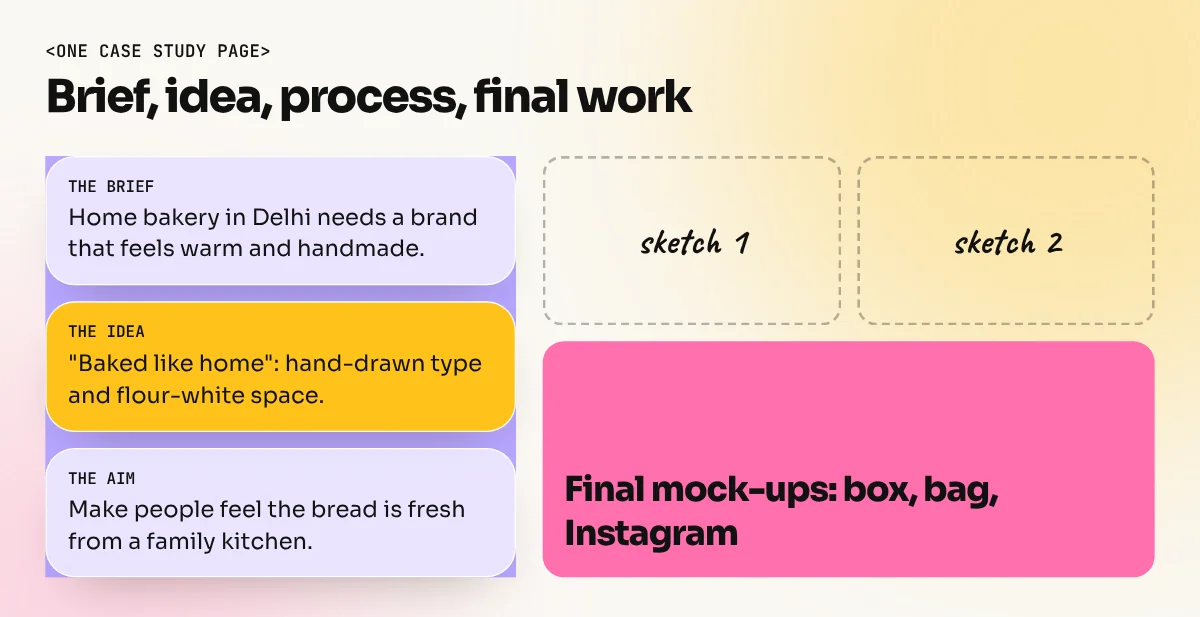
Do not just show the final image. Tell a short story in five parts:
- The brief: who the brand is and what problem you solved (2 to 3 lines).
- The idea: your concept in one sentence.
- The process: a few sketches, moodboard or rejected options.
- The final work: shown on realistic mock-ups: a hoarding, a phone, a box, a printed page.
- The result you aimed for: what the design should make people feel or do.
Keep text short. Reviewers skim.

In the video above, brand designer Katrina Romulo (edgykatrina) walks through planning, curating and building a portfolio and breaks down one of her own case studies. Her advice on choosing only the work you want to be hired for is worth hearing.
Step 4: Present it well
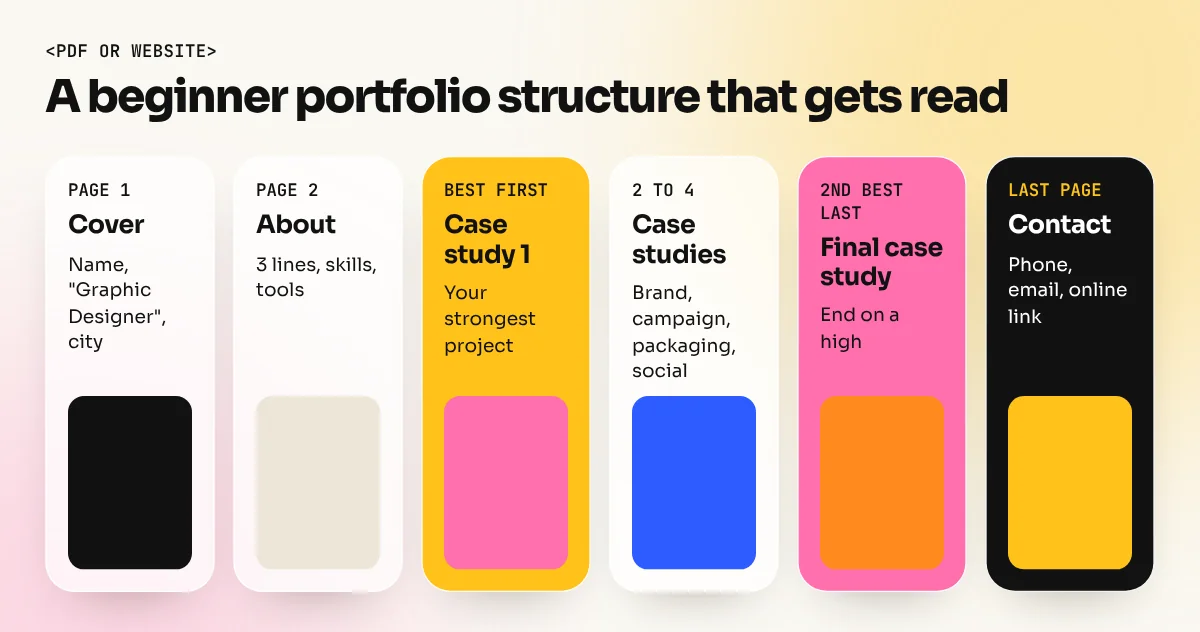
- Best project first, second-best last. First and last impressions stick.
- Consistent layout: same fonts, margins and caption style on every page.
- Mock-ups matter: a poster on a real hoarding mock-up reads as "professional" instantly.
- Simple personal branding: your name, one or two colours, one or two fonts.
- Contact details on every format: phone, email, city.
Step 5: Where to host it
Have two versions:
- A PDF (10 to 15 pages, under 10 MB) to send on email and WhatsApp.
- An online version on Behance or a simple personal website, linked from your CV and LinkedIn.
Name the file properly: "YourName-Graphic-Designer-Portfolio.pdf", not "final_final_2.pdf".
Mistakes that cost interviews
- Too many projects. Twenty average pieces hide your three good ones.
- Software tutorials as portfolio pieces. Reviewers recognise them.
- Raw AI images with no design work on top.
- Spelling mistakes. One typo on a poster suggests carelessness with client work.
- Using a real brand's logo as if they hired you. Make it clearly a concept, or use a fictional brand.
- No process. Without sketches or thinking, the work looks lucky rather than skilled.
Build your portfolio with a trainer
In our 6-month graphic design diploma, the last month is set aside for portfolio building, timed client briefs and interview practice, with a trainer reviewing every case study. You can see the kind of campaigns students build on our student work page. Not in Delhi? The same course runs as live online graphic design classes.
Just starting out? Read how to learn graphic design from scratch first.
Frequently asked questions
How many projects should a beginner graphic design portfolio have?
Four to six strong projects is enough. Reviewers spend very little time on each portfolio, so a few great case studies beat twenty average pieces. Put your strongest project first.
Can I use made-up brands in my portfolio?
Yes, as long as you say they are self-initiated or concept projects. Concept work for fictional or local brands is normal for beginners. Never present it as paid client work.
Should my portfolio be a PDF or a website?
Have both. A PDF of 10 to 15 pages is easy to send on email or WhatsApp. An online page (Behance or a simple personal site) is easy to share on a CV and LinkedIn.
Can I put AI-generated images in my portfolio?
You can show how you used AI inside a project, but the design decisions must be yours: the idea, layout, typography and finishing. Label AI-assisted parts honestly. A portfolio full of raw AI images shows no design skill.