Graphic Designer Resume: Format, Skills and a Simple Layout That Works
Graphic designer resume guide: the best format, skills and tools to list, how freshers show projects and a clean one-page layout recruiters can read.
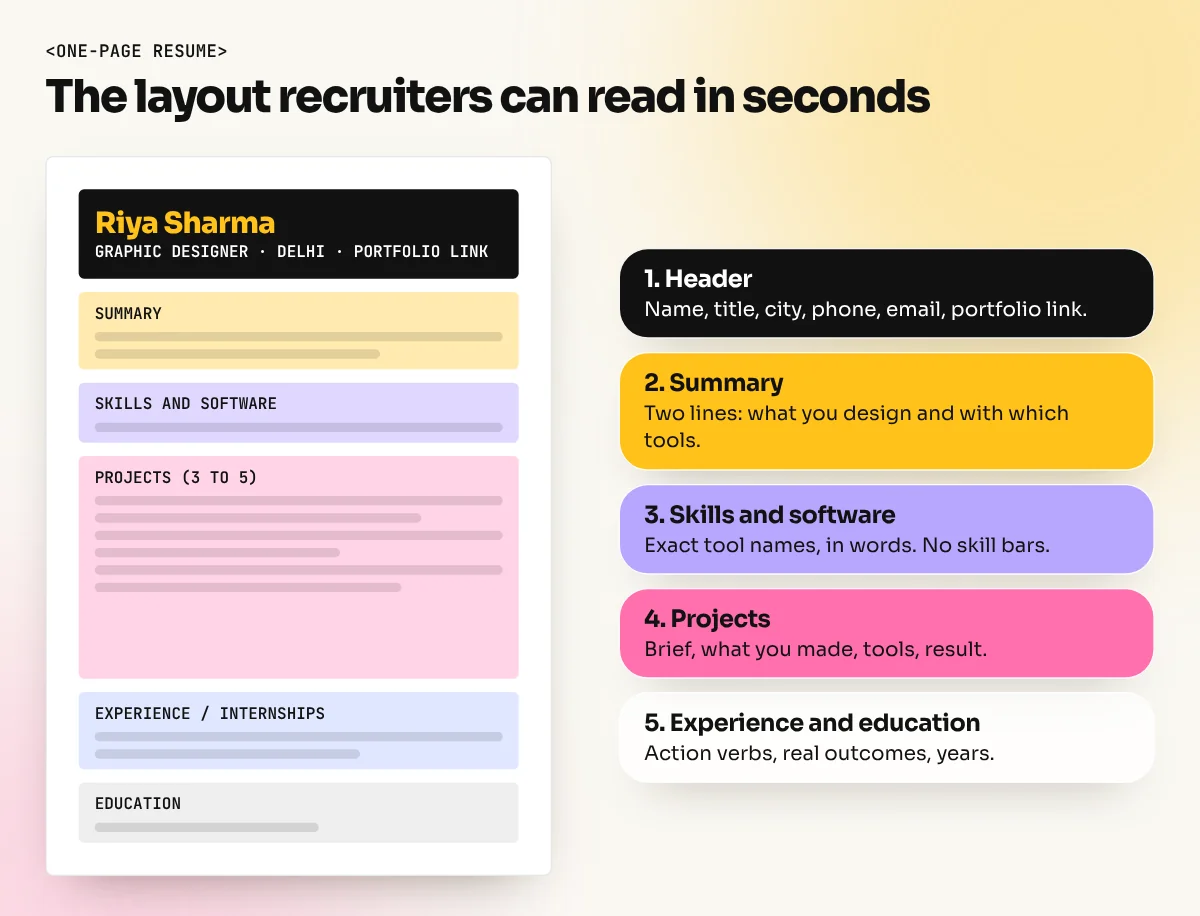
A good graphic designer resume is one clean page with your name, contact details and portfolio link at the top, a two-line summary, skills and software, three to five projects with results, experience or internships and education. Use a simple layout that both people and applicant tracking systems can read, then send it as a PDF.
A graphic designer resume is a one-page summary of your skills, tools, projects and experience, with your portfolio link right at the top. Recruiters look at it for a few seconds and then decide whether to open your portfolio. So the resume has one job: get that click. This guide shows the best format, what to write in each section, which skills to list and a simple layout that works for freshers and experienced designers in India.
Resume vs portfolio: what each one does
Many new designers mix these up. They do different jobs and you need both.
| Resume | Portfolio | |
|---|---|---|
| Purpose | Shows who you are and why to look further | Shows how good your work is |
| Length | One page (two for senior roles) | 8 to 15 projects or pages |
| Format | PDF, plain text that software can read | Behance, a website or a PDF |
| What recruiters check | Skills, tools, projects, experience, location | Ideas, layout, type, finish, variety |
| Time spent | Usually seconds | Minutes, if the resume worked |
The resume does not need to prove you are creative. It needs to prove you are organised, clear and worth a look. If you are still building your work samples, read our guide on how to build a graphic design portfolio with no experience first.
The best format for a graphic designer resume
For most designers the reverse-chronological format works best: your latest work and projects come first. Freshers can use a project-first format, where projects sit above education because they are the strongest proof.
Keep the structure in this order:
- Header: name, job title ("Graphic Designer"), city, phone, email, portfolio link, LinkedIn.
- Summary: two lines about what you design and what you are good at.
- Skills and software.
- Projects (freshers) or Experience (working designers).
- Experience or internships (freshers) or Selected projects (working designers).
- Education and certificates.
Section by section: what to write
Header
Put your portfolio link in the header, written out in full and clickable in the PDF. Use a professional email address with your name in it. City is enough for location; you do not need your full home address. Indian resumes often include date of birth, marital status and a photo out of habit. These are not needed for a design job and they take space you can use for projects.
Summary
Two lines, no clichés. Say what you design, with which tools and for what kind of client.
Graphic designer focused on social media creatives and print for retail brands. Skilled in Photoshop, Illustrator and InDesign, with campaign projects for food and fashion brands.
That works better than "Hard-working and passionate designer looking for a challenging role".
Projects
This is the most important section for freshers. For each project write four short lines:
- Project name and type: "Kulhad Chai Café: brand identity and menu".
- The brief: one line on what the client needed.
- What you made: logo, menu, three Instagram posts, shop board.
- Tools and result: Illustrator, InDesign; "menu printed and used in the café".
If a project was a course or practice brief, say so honestly. Recruiters respect real-looking student work. They do not respect invented clients.
Experience and internships
Use action verbs and real outcomes: "Designed 60+ social media posts a month for three clients", "Prepared print-ready files for hoardings and standees". Avoid duties that say nothing, like "Responsible for design work".
Education
Degree or class 12, plus any diploma or design course, with the year. Freshers can add the main subjects of the course in one line.
Skills and software to list
Recruiters and job portals search by keywords, so name the tools exactly as they appear in job ads. Split them into two groups.
| Type | Examples to list (only if you can really use them) |
|---|---|
| Software | Adobe Photoshop, Adobe Illustrator, Adobe InDesign, CorelDraw, Canva, Figma, After Effects |
| AI tools | Photoshop Generative Fill and AI image tools for ideas and mock-ups |
| Design skills | Typography, layout, branding, social media creatives, packaging, print production |
| Work skills | Meeting deadlines, taking feedback, presenting ideas, working with printers |
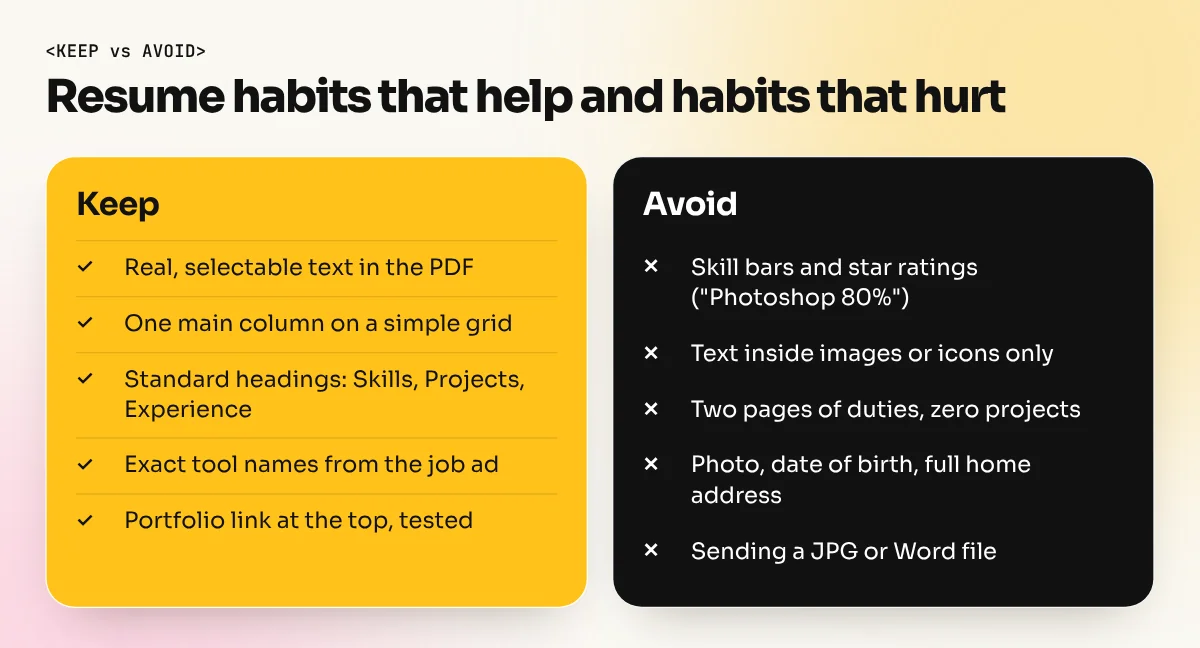
Do not use skill bars or star ratings ("Photoshop 80%"). Nobody knows what 80% means and the graphic is unreadable to software. If you want to show level, write it in words, such as "Advanced: Photoshop, Illustrator. Working knowledge: After Effects".
Read the job ad before you send the resume. If it asks for "packaging design" and "CorelDraw" and you have both, make sure those exact words appear in your skills or projects.
Design the resume so people and software can read it
Many companies and job portals use an applicant tracking system (ATS) to store and search resumes. Career guidance from universities and recruitment firms gives the same advice: these systems read plain text best. A layout full of images, text boxes and icons may come out jumbled or empty on the recruiter's side.
Follow these rules and your resume will look good and still be readable:
- One main column. A narrow side column for contact and skills is fine if the text is real text, but a single column is safest.
- Real text, not images. Every word must be selectable in the PDF. Test it by copying the text and pasting it into a plain note.
- Standard section headings: Summary, Skills, Projects, Experience, Education.
- One or two fonts, body text around 10 to 11 points, headings slightly larger.
- Plenty of white space and consistent margins. Line everything up to a simple grid.
- One accent colour for your name or headings. Keep body text dark on white.
- Save as PDF and name the file properly, for example "Riya-Sharma-Graphic-Designer-Resume.pdf".
Designing your resume in InDesign gives you full control over type, spacing and clean PDF export. Canva and Word also work if you keep the layout simple. Good alignment and spacing are themselves a design sample, so treat the resume like a small layout project. Our guide to layout design and grids will help.
Fresher vs experienced: what changes
| Fresher | 3+ years of experience | |
|---|---|---|
| First section after summary | Projects | Experience |
| Main proof | Portfolio projects, internships, freelance jobs | Brands handled, campaigns, team work, results |
| Length | One page | One page, two if needed |
| Education | Near the top is fine | At the bottom, short |
| Extra | Course name and main subjects | Tools you manage, juniors you guide |
Freshers often feel they have nothing to put on a resume. That is rarely true. A design course, college fest posters, a menu for a relative's shop and a logo for a friend's startup are all real projects if you describe the brief and what you delivered.
Common graphic designer resume mistakes
- No portfolio link, or a broken link. Check it every time you apply.
- Two or three pages of duties and no projects.
- Skill bars, pie charts and icons instead of clear words.
- Spelling mistakes in software names: "Photoshope", "Coral Draw", "Illustartor".
- One resume for every job. Change the summary and the skills order for each role.
- A heavy decorated template that hides your actual information.
Send it the right way
When you apply, write two or three lines in the email or portal message: the role, one line on your strongest project and the portfolio link again. Attach the PDF, not a Word file or a JPG. Keep a simple sheet of where you applied and when, then follow up once after about a week. Our guide to graphic designer jobs in India lists where to apply and a 30-day plan.
If you want a structured way to build both the skills and the projects that fill this resume, our 6-month graphic design diploma ends with a portfolio of real-looking campaigns. In the InDesign course you learn the layout and export skills that make a resume, a portfolio PDF and a print job look professional.
Frequently asked questions
Should a graphic designer resume be creative?
It should be clean and well designed, not decorated. Good type, spacing and alignment show your skill. Heavy graphics, skill bars and text inside images can confuse recruiters and resume-reading software, so keep the creativity for your portfolio.
How long should a graphic designer resume be?
One page for freshers and designers with up to about five years of experience. Senior designers with long project lists can use two pages, but the first page must still hold the most important information.
Can I make my resume in Canva?
Yes, but keep it simple and check that the text in the PDF can be selected and copied. If it exports as a flat image, software cannot read it. Designers who know InDesign usually get more control over type and spacing there.
What should a fresher put on a graphic designer resume with no experience?
Put your portfolio link at the top, then three to five projects with the brief, the tools used and what you made. Add course projects, college fests, freelance work for local shops and internships. Real-looking projects matter more than job titles.