Graphic Designer Skills Employers Ask For in 2026
Graphic designer skills employers ask for in 2026: design basics, software, AI tools, print, communication and time management, with a plan to build each one.
The graphic designer skills employers ask for most are design basics (typography, colour, layout and hierarchy), software (Photoshop, Illustrator, InDesign and Canva), AI image tools used with judgement, print and file preparation, plus communication, feedback handling and time management. A portfolio that shows these skills on real briefs matters more than a list on your resume.
The graphic designer skills employers ask for in 2026 fall into three groups: design basics, software with AI tools and work skills such as communication and time management. A designer who has all three and can prove them in a portfolio gets hired faster than one who only knows the software. This guide lists each skill, why employers care, how they test it and the simplest way to build it.
What employers actually look for
Job posts for designers in India repeat the same few lines: strong portfolio, Photoshop and Illustrator, good sense of typography and colour, able to meet deadlines, good communication. Official career data says much the same thing.
The US Bureau of Labor Statistics lists six important qualities for graphic designers: analytical skills, artistic ability, communication skills, computer skills, creativity and time-management skills. It also notes that employers rely on a portfolio that shows creativity and originality when they hire.
At a wider level, the World Economic Forum's Future of Jobs Report 2025 found that employers rate analytical thinking as the top core skill, with creative thinking also in the top five. AI and big data are the fastest-growing skills to 2030 and the report expects about 39 percent of workers' core skills to change by then. For designers, that means two things: the thinking side of design matters more than ever and AI tools are now part of the job.
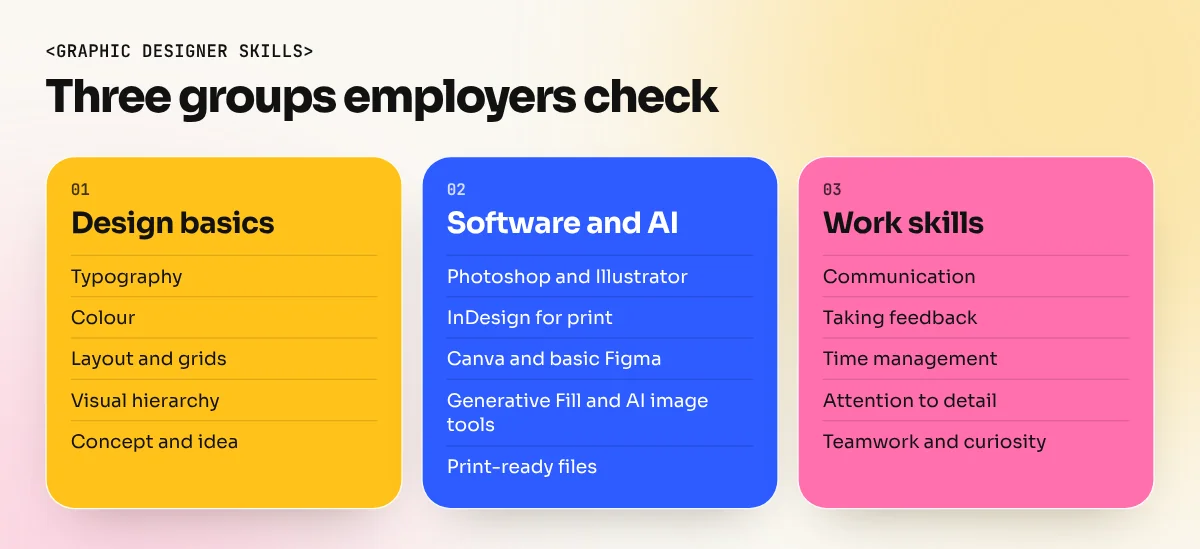
Design basics: the skills under every other skill
Software changes every year. These do not. Interviewers look for them in every portfolio piece, even when they do not name them.
| Skill | What it means | How employers spot it |
|---|---|---|
| Typography | Choosing and setting fonts so text is clear and fits the brand | Clean headings, readable body text, good spacing |
| Colour | Picking colours that fit the message and work in print and on screen | A limited, consistent palette in each project |
| Layout and grids | Placing elements in an order that feels planned | Aligned edges, consistent margins |
| Visual hierarchy | Making people read the most important thing first | The headline or offer is seen in two seconds |
| Concept and idea | Solving the brief with an idea, not just decoration | Projects that explain the problem and the thinking |
| Composition | Balance, contrast, white space and focus | Designs that are not crowded |
The easiest way to build these is daily practice on real-looking briefs. Redesign a local restaurant menu, a coaching centre hoarding or a chai brand's Instagram post. Then compare your work with professional examples and note what is different.
Software skills employers expect
Most Indian design jobs list Adobe tools by name. Here is what each one is used for and the level employers expect from a fresher.
| Software | Used for | Fresher level expected |
|---|---|---|
| Adobe Photoshop | Photo editing, social posts, ad creatives, mockups | Layers, masks, selections, retouching, Generative Fill |
| Adobe Illustrator | Logos, icons, illustrations, vector artwork | Pen tool, shapes, type, clean vector export |
| Adobe InDesign | Brochures, menus, books, multi-page print | Master pages, styles, grids, print PDF with bleed |
| Canva | Fast social posts and templates for clients | Brand kits, templates, resizing |
| Figma | Website and app screens, team collaboration | Frames, auto layout basics (a plus, not always required) |
You do not need every tool on day one. Photoshop and Illustrator together cover most beginner jobs. A focused Photoshop course is a sensible first step, because almost every design team uses it every day. Add InDesign if you want print, publishing or packaging work.
AI skills: what is now expected
In 2026, many design teams use AI tools for raw material and speed. Employers increasingly ask whether you can use them well, not whether you have heard of them.
- Photoshop Generative Fill and AI image tools to extend backgrounds, remove objects and make quick variations.
- Writing clear prompts that describe the subject, light, angle, style and mood, so you get useful material.
- Judging and fixing AI output. Spotting odd hands, broken text, fake-looking products and anything that looks like an existing brand.
- Knowing the limits. AI images are usually raster, so logos and brand marks still need to be drawn as clean vectors.
The key word is judgement. A designer who knows typography and layout can turn AI material into a finished design. A person who only knows prompts cannot.
Production and print skills
These are the skills that separate a student portfolio from a working designer. They are also the ones employers test in a practical round, because mistakes here cost real money.
- Colour modes. RGB for screens, CMYK for print and knowing why a bright screen colour can print dull.
- Resolution. 300 PPI at actual size for most print, the right pixel sizes for each social platform.
- Bleed and safe area. Usually 3 mm bleed for print and keeping text away from the trim.
- File export. Print-ready PDF, PNG, JPG, SVG and when to use each.
- File organisation. Named layers, linked images packaged and fonts handed over correctly.
- Resizing a design into many formats without breaking the layout.
Work skills that decide who gets hired
Two designers with similar portfolios often differ in these. They come up in almost every interview and they decide who gets the second project.
| Work skill | What it looks like in practice |
|---|---|
| Communication | Asking the right questions at the brief, explaining your design in simple words |
| Taking feedback | Listening without arguing, asking what problem the comment is pointing at |
| Time management | Breaking a job into steps, giving honest delivery times, meeting them |
| Attention to detail | Checking spellings, prices, phone numbers and logos before sending |
| Teamwork | Working smoothly with copywriters, marketers, printers and developers |
| Curiosity | Keeping up with new tools and studying good design every week |
Our list of graphic design interview questions with sample answers shows how employers test these in conversation. Most of the questions are really about these work skills.
How to build these skills in six months
A plan works better than random tutorials. Here is a simple monthly path that many beginners follow.
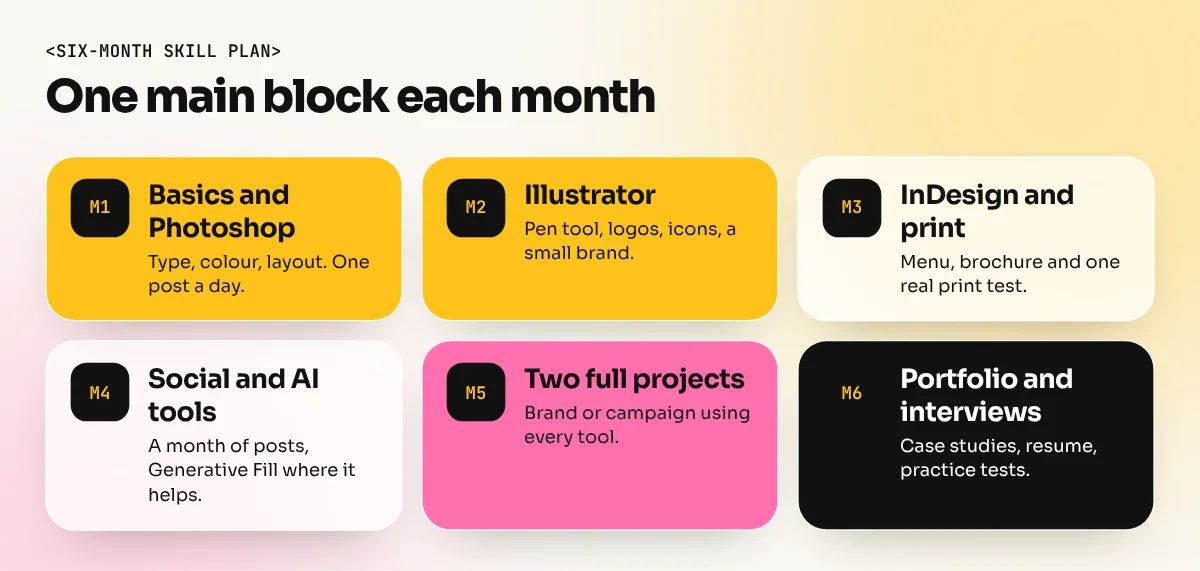
- Month 1: Design basics and Photoshop. One small poster or post every day.
- Month 2: Illustrator. Logos, icons and the pen tool, plus a small brand project.
- Month 3: InDesign and print. A menu, a brochure and one real print test.
- Month 4: Social media and AI tools. A month of posts for an imaginary local brand, using Generative Fill where it helps.
- Month 5: Two complete brand or campaign projects that use all your tools.
- Month 6: Portfolio, resume and interview practice.
The 6-month graphic design diploma follows a similar order, with one main block each month and a portfolio at the end. Whichever route you take, finish with a portfolio and a clear resume. Our guide to the graphic designer resume shows how to list these skills without filling the page with software logos.
How to show your skills on a resume and portfolio
Listing skills is easy. Proving them is what gets interviews.
- Show skills inside projects. Instead of "Typography: expert", show a menu where the type hierarchy is clearly working.
- Write two lines per project: the problem and what you did. This proves concept and communication skills.
- Include process. Sketches, early drafts and the final version show how you think.
- Keep the tools list short and honest. List only software you can use under test conditions.
- Add one print piece you have actually printed, if possible. It shows production skill.
The bottom line
The graphic designer skills that matter most in 2026 are the basics, the main Adobe tools, AI used with judgement, clean print files and the work habits that make you easy to work with. Build them one month at a time, prove each one in a real project and your portfolio will answer the question employers are really asking: can this person do the job from day one?
Frequently asked questions
What are the most important skills for a graphic designer?
Typography, colour, layout and visual hierarchy come first, because every other skill depends on them. Next come Photoshop, Illustrator and InDesign, then communication, taking feedback and meeting deadlines.
Which software skills do graphic designers need in 2026?
Most job posts in India ask for Adobe Photoshop and Illustrator, many add InDesign for print and Canva for quick social work. Basic Figma and Photoshop Generative Fill and AI image tools are now common extras.
Can I become a graphic designer without drawing skills?
Yes. Many designers cannot draw well. Rough sketching to plan ideas helps a lot, but layout, type, colour and software skills matter more for most jobs. Illustration-heavy roles are the exception.
How long does it take to learn graphic design skills?
With regular daily practice, most beginners learn the core tools and basics in about six months of structured study. Becoming job-ready also needs a portfolio of real projects, which many people build in the same period.