Motion Graphics Explained: What It Is and How Designers Start
Motion graphics means designed text, shapes and icons that move. See where it is used, the main tools, core motion principles and a simple path to start.
Motion graphics is graphic design that moves. Designers animate text, shapes, icons, logos and charts to explain an idea or sell a product in a reel, ad, explainer or title sequence. You need strong layout, type and colour first, then timing and easing in a tool such as Adobe After Effects.
Motion graphics is graphic design that moves. Instead of a still poster, a motion designer animates text, shapes, icons, logos and charts so that an idea is explained or a product is sold in a few seconds. You see motion graphics in Instagram reels, YouTube intros, app screens, TV channel logos, election result charts on news channels and the animated "Sale ends Sunday" ads that play before a video. This guide explains what motion graphics is, how it differs from animation and video editing, the tools, the core principles and a simple path to start if you are already learning graphic design.
Think of a Delhi chai brand. The print team makes a poster with a kulhad, a headline and a logo. The motion team takes the same poster and makes the steam rise, the headline slide in word by word and the logo pop at the end, all in eight seconds. The design is the same. Motion adds time.
What motion graphics means
The phrase has a long history. American animator John Whitney, often called a father of computer animation, named his company Motion Graphics Incorporated in 1960. Film title designers of that period, such as Saul Bass, showed that moving type and shapes could set the mood of a film before the first scene.
Today the term covers any designed graphic that changes over time. A motion graphic usually has:
- Designed elements: type, shapes, icons, illustrations, photos or charts, built with the same rules as a print layout.
- Time: a start, a middle and an end, usually 5 to 60 seconds.
- A purpose: explain a feature, show a number, introduce a brand or push people to act.
- Sound (often): music, a voiceover or sound effects timed to the movement.
Motion graphics vs animation vs video editing
People use these words loosely, so it helps to see them side by side.
| Motion graphics | Character animation | Video editing | |
|---|---|---|---|
| Main material | Text, shapes, icons, charts, logos | Characters and scenes | Camera footage |
| Main question | How do we explain or sell this? | How does this character act and feel? | Which shots, in what order? |
| Common work | Explainers, ads, reels, logo reveals, titles | Cartoons, films, games | Vlogs, films, ads, events |
| Main tools | After Effects, Illustrator, Figma, Blender | Toon Boom, Blender, Maya | Premiere Pro, DaVinci Resolve, Final Cut |
| Starts from | Graphic design skills | Drawing and acting skills | Storytelling and footage |
The lines overlap. A video editor adds animated titles, a motion designer drops in footage and a 3D artist builds a product shot for an ad. Still, if you enjoy typography and layout, motion graphics is the natural next step from graphic design.
Where motion graphics is used
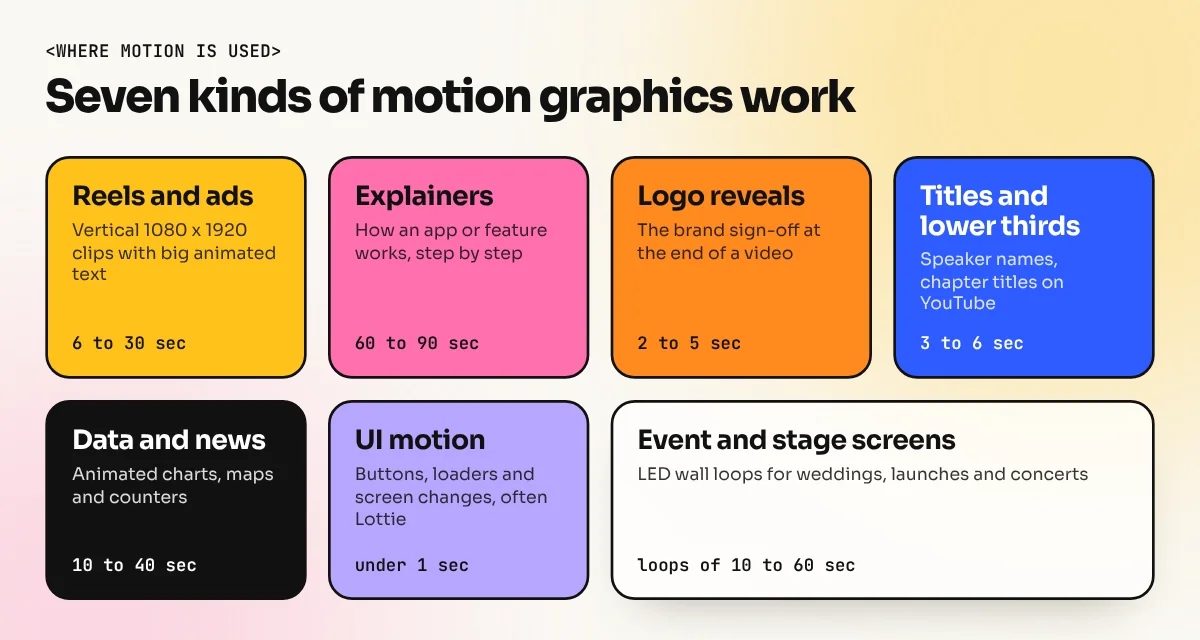
Short video now takes most of the attention on social platforms, so brands need moving versions of almost everything they used to print. Common work includes:
- Social media reels and ads: 9:16 vertical clips at 1080 x 1920 pixels with big animated text.
- Explainer videos: an app or a bank shows how a feature works in 60 to 90 seconds.
- Logo animations: a two to five second reveal at the end of every brand video.
- Lower thirds and titles: the name strip under a speaker, chapter titles on YouTube.
- Data and news graphics: animated bar charts, maps and counters on news channels.
- UI motion: buttons, loaders and screen transitions in apps, often exported as Lottie files.
- Event and stage screens: LED wall loops at weddings, product launches and concerts.
Is motion graphics a good career?
There is real demand, but be honest about the numbers. The US Bureau of Labor Statistics groups motion designers with "special effects artists and animators". It reports about 51,900 jobs in the US in 2025 and projects little or no change in employment from 2025 to 2035, with about 4,200 openings a year as people retire or change jobs. The same page notes that artificial intelligence can now finish some animation tasks faster, which may reduce demand for routine work.
For India, no government body publishes a separate count for motion designers, so treat any exact figure online with care. What you can see for yourself on job portals is that agencies, edtech companies, news channels, startups and YouTube creators ask for "motion graphic designer" or "video editor with After Effects" skills. The pattern is the same as in print design: people who only apply ready templates are easy to replace, while people who can design the frames and plan the motion are hired. Our guide on graphic designer skills lists the base skills that carry over.
The core principles of motion
Good motion follows a few rules. Disney animators described 12 classic principles in the 1981 book The Illusion of Life. Motion designers use a shorter working set:
| Principle | What it means | Simple example |
|---|---|---|
| Timing | How many frames a move takes | A logo pop in 8 frames feels snappy, in 30 frames it feels calm |
| Easing | Speed up and slow down instead of a flat speed | Text that slows before it stops looks natural |
| Anticipation | A small move back before the main move | A button dips slightly, then jumps up |
| Overlap | Parts stop at different times | Each word of a headline lands a few frames apart |
| Hierarchy in time | The most important thing moves first or biggest | The offer appears before the small print |
| Rhythm | Moves follow the beat of the music | Cuts and pops land on the drum hits |
Most work in India is made at 25 or 30 frames per second, with 24 used for a film look. Pick one frame rate at the start of a project and keep it for every file.

In this short video, logo animator Joshua Craigie shows ten motion design principles with simple shapes, which makes the ideas above easy to see in action.
Tools for motion graphics
You do not need every app. Start with one design tool and one motion tool.
| Tool | Used for | Cost model |
|---|---|---|
| Adobe After Effects | Industry standard for 2D motion and compositing | Adobe subscription |
| Adobe Illustrator or Figma | Designing the frames and vector artwork | Subscription or free plan |
| Blender | 3D motion, product shots, free and open source | Free |
| Cinema 4D | 3D motion in many agencies | Subscription |
| DaVinci Resolve (Fusion page) | Editing plus node-based motion | Free version and paid Studio |
| Canva and CapCut | Quick social clips from templates | Free and paid plans |
| Rive and Lottie | Small, light animations for apps and websites | Free and paid plans |
A clean workflow is: design the key frames in Illustrator, import the layers into After Effects, animate, add sound, then export an MP4 for social media or a Lottie file for an app. Learning the Illustrator course first makes this much easier, because clean vector layers animate far better than flat images.
How a graphic designer can start, step by step
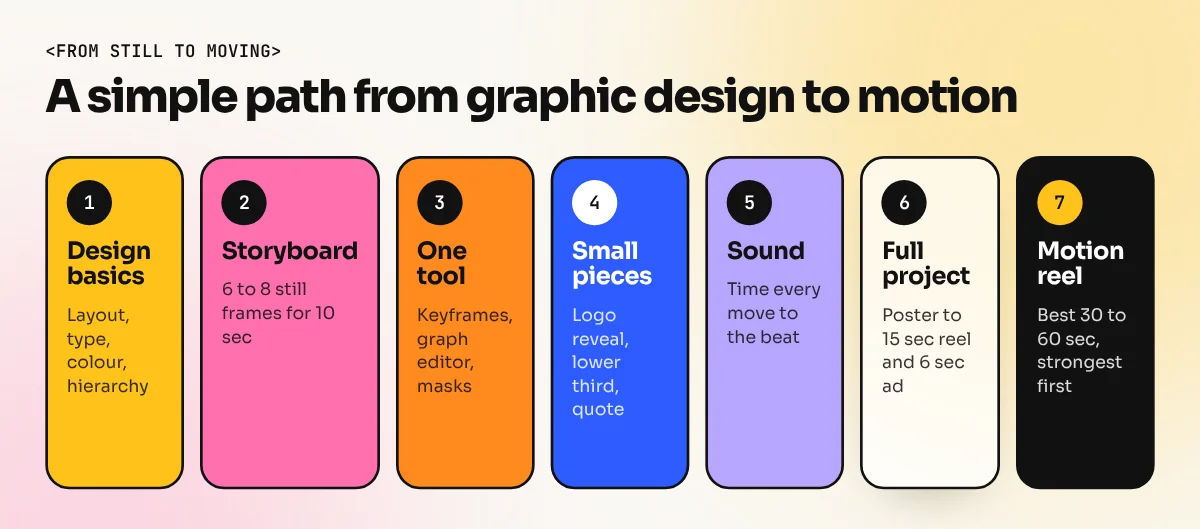
If you already know some graphic design, this simple path works:
- Get the basics strong. Layout, type, colour and the principles of graphic design decide whether a frame looks good. A structured graphic design diploma covers these before any software.
- Design in frames. Make a storyboard of 6 to 8 still frames for a 10 second ad. If the still frames do not work, the motion will not work either.
- Learn one motion tool. Pick After Effects or DaVinci Resolve and learn keyframes, the graph editor, masks, shape layers and text animators.
- Animate small things first. A logo reveal, a lower third, a single animated quote. Each should be under 10 seconds.
- Add sound and rhythm. Time your moves to the music. This one habit makes simple work look professional.
- Make one full project. Turn a print poster you already designed, such as a cafe menu offer, into a 15 second reel and a 6 second story ad.
- Build a motion reel. Put your best 30 to 60 seconds of work into one showreel. Clients watch the first few seconds, so open with the strongest piece.
Common beginner mistakes
- Moving everything at once. When every element moves, nothing stands out. Move the main message first.
- Linear motion. Flat speed looks robotic. Use easing on almost every keyframe.
- Too fast to read. A line of text needs at least as long on screen as it takes to read it twice.
- Ignoring the safe area. On reels, the app covers the bottom and right side with buttons and captions. Keep text away from those edges.
- Heavy presets. Ready-made effects look the same on every channel. Clients notice.
- No design first. Jumping into keyframes before the layout is fixed wastes hours.
If you are still choosing a direction, remember that motion design sits next to branding, print, packaging and UI work. The same design basics feed all of them, so time spent on layout and type is never wasted.
Frequently asked questions
Is motion graphics the same as animation?
Motion graphics is one kind of animation. Character animation tells a story through characters who act. Motion graphics animates designed elements like text, shapes, icons and charts, usually to explain or promote something.
Which software is used for motion graphics?
Adobe After Effects is the most common tool in studios and agencies. Designers also use Illustrator or Figma to design the frames, Blender or Cinema 4D for 3D, DaVinci Resolve for editing with Fusion and Canva or CapCut for quick social clips.
Do I need to know graphic design before motion graphics?
Yes, it helps a lot. Every moving frame is still a layout. If the type, colour and spacing are weak, good animation cannot save it. Most motion designers start as graphic designers or video editors.
Can I learn motion graphics on a normal laptop?
You can start simple 2D work on a decent laptop with 16 GB RAM and an SSD. Long videos, 3D and heavy effects need more memory and a good graphics card, so plan to upgrade once you take paid work.