Font Pairing: Combinations That Always Work (With Simple Rules)
Font pairing made simple: 5 rules, 12 tested font combinations for posters, menus, resumes and websites, Hindi plus English pairs and the mistakes to avoid.
Font pairing means choosing two fonts that look good together and do different jobs: one for headings, one for body text. Pair fonts with clear contrast, such as a serif heading with a sans serif body, keep to two families, match their x-height and mood and build hierarchy with size and weight before adding a third font.
Font pairing is the skill of choosing two fonts that look good together and do different jobs: one for headings and one for body text. Good pairs have clear contrast but a shared mood. A bad pair makes a poster, menu card or Instagram post look cheap even when the photo and colours are fine. This guide gives you five simple rules, 12 font combinations that always work, a Hindi plus English section and the mistakes beginners make most often.
Why font pairing matters so much
Most people never notice fonts consciously. They just feel that a design is "premium", "fun", "serious" or "messy". A lot of that feeling comes from the type.
Think of a Delhi sweet shop's Diwali box. If the brand name is set in a heavy decorative font and the ingredients list uses the same font, nobody can read the small text. If both use a plain office font, the box looks like a government form. The right pair gives you a beautiful brand line on top and an easy, readable list below.
Font pairing affects three things:
- Hierarchy. The reader should know what to read first, second and third. Two different fonts make that easier.
- Mood. A serif feels traditional and trustworthy. A rounded sans feels friendly. A condensed bold sans feels loud and urgent.
- Readability. Body text has to be comfortable at small sizes, on a phone or on a printed leaflet.
If you are new to type, first read our guide to layout design rules and grids. Fonts and layout always work together.
The 5 rules of font pairing
These rules cover almost every real project.
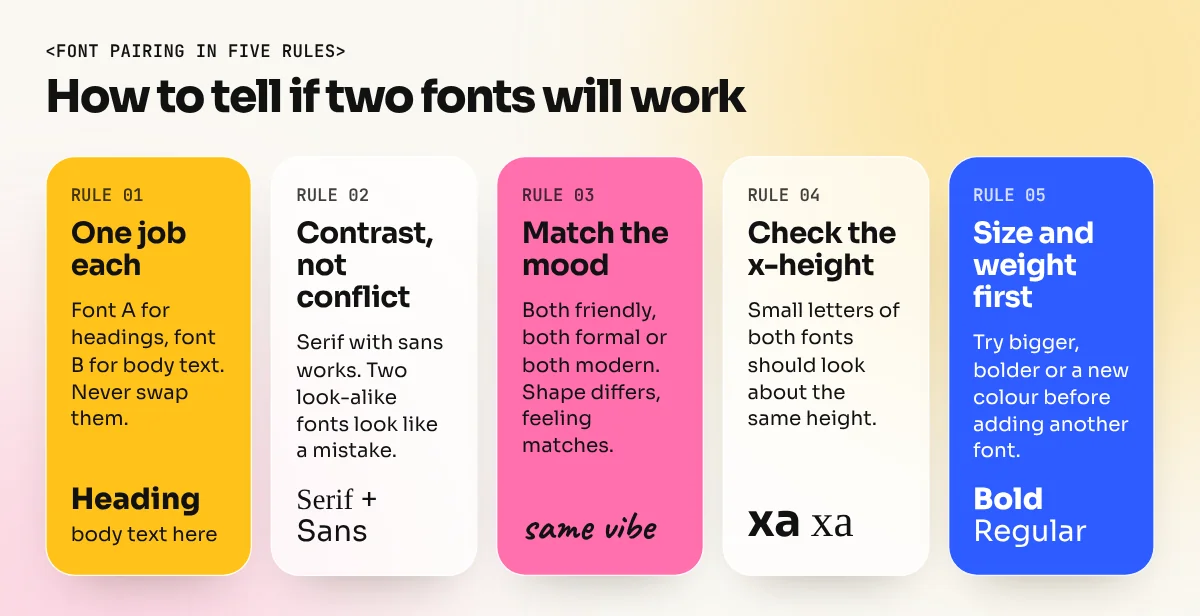
1. Give each font one job
Decide before you start: font A is for headings, font B is for body text. Do not swap them around inside the same design. Readers learn the pattern in seconds and they get confused when it breaks.
2. Contrast, not conflict
The two fonts should be clearly different. The classic way is a serif with a sans serif. Other good contrasts are bold display with a calm text font, or condensed with regular width. What you must avoid is two fonts that are nearly the same, for example two similar geometric sans fonts. That looks like an error.
3. Match the mood
Contrast in shape, harmony in feeling. A playful hand-drawn headline does not sit well next to a cold corporate body font. Ask: are both fonts friendly, both formal, both modern? If the answer is yes, the pair usually works.
4. Check the x-height
The x-height is the height of small letters like "x", "a" and "e". Fonts with similar x-heights look balanced next to each other, even when their styles are different. Type a line of both fonts at the same size and compare the small letters.
5. Build hierarchy with size and weight first
Before you add a new font, try making the heading bigger, bolder or a different colour. Many great designs use one family in two or three weights. Add a second family only when you need a change in personality.
12 font combinations that always work
All fonts below are free on Google Fonts, so you can use them for client work without buying a licence. Always check the licence on the font's page before you use any font commercially.
| # | Heading font | Body font | Mood | Good for |
|---|---|---|---|---|
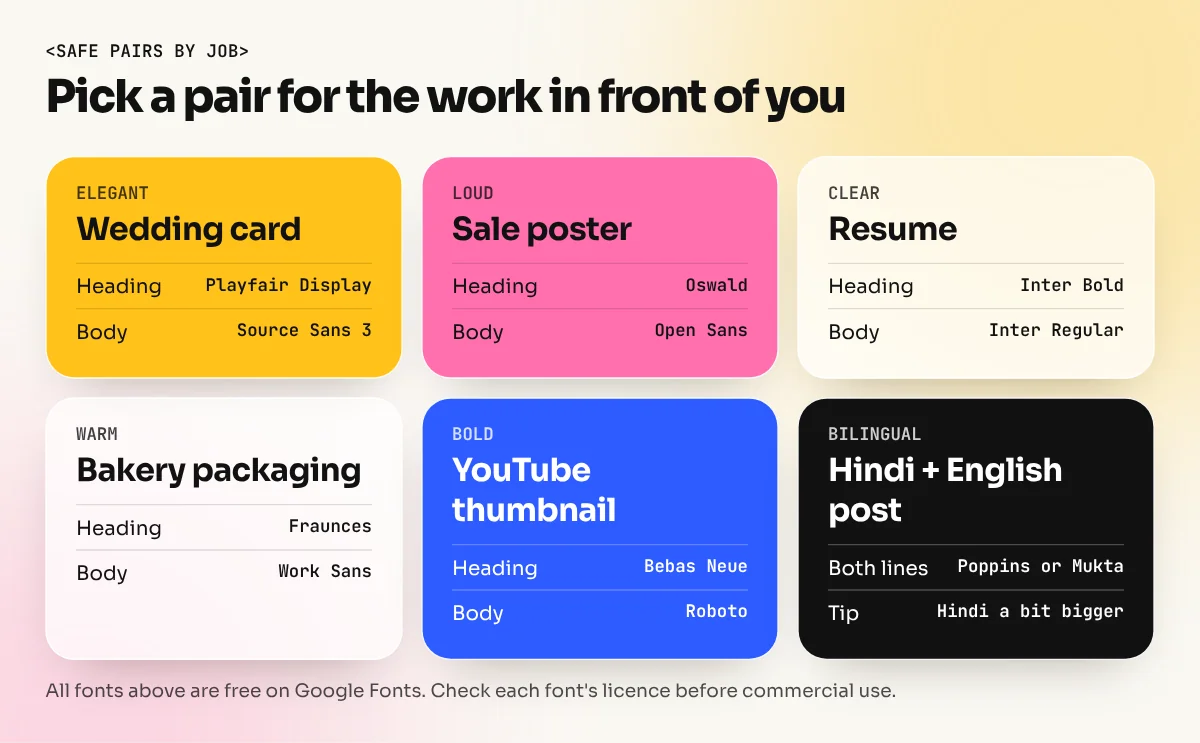
| 1 | Playfair Display | Source Sans 3 | Elegant, editorial | Wedding cards, magazines, fashion |
| 2 | Montserrat | Merriweather | Modern and trustworthy | Brochures, reports, NGOs |
| 3 | Poppins | Lora | Friendly but serious | Education, coaching centres |
| 4 | Oswald | Open Sans | Loud, urgent | Sale posters, sports events |
| 5 | Bebas Neue | Roboto | Bold, cinematic | YouTube thumbnails, event banners |
| 6 | DM Serif Display | DM Sans | Premium, clean | Cafés, salons, boutique brands |
| 7 | Inter Bold | Inter Regular | Neutral, modern | Apps, dashboards, resumes |
| 8 | Fraunces | Work Sans | Warm, quirky | Bakeries, food brands, packaging |
| 9 | Archivo Black | Archivo | Strong, industrial | Tech and real estate ads |
| 10 | Libre Baskerville | Lato | Classic, calm | Law firms, books, certificates |
| 11 | Space Grotesk | IBM Plex Sans | Techy, smart | Startups, product launches |
| 12 | Abril Fatface | Nunito | Fun, retro | Restaurant menus, kids' brands |
Use the table as a starting point, not a rulebook. Type a real headline and a real paragraph in each pair and look at it at the size it will be used.
How to test a pair in two minutes
- Write a real headline from your project, for example "Chai, Samosa and Stories since 1987".
- Write two short paragraphs of body text below it.
- Set the heading font at three times the body size.
- Print it or look at it on a phone at real size.
- Ask a friend which line they read first and whether the body text is comfortable. If the answer is unclear, change one font, not both.
Font pairing for Hindi and English
Indian designers often set Hindi and English on the same poster, hoarding or packet. This is where many designs go wrong, because a Devanagari font and a Latin font from different families rarely match in size, weight and stroke style.
The simple fix is to use a family designed for both scripts. A few free options:
- Poppins, designed by the Indian Type Foundry, supports Devanagari and Latin with nine weights.
- Mukta and Hind also cover Devanagari and Latin and stay clear at small sizes.
- Tiro Devanagari Hindi gives a more traditional, bookish feel for headings.
Tips that save time:
- Set the Hindi line slightly bigger than the English line. Devanagari letters hang from the shirorekha (the top line), so they can look smaller at the same point size.
- Keep the same weight for both lines when they carry the same message.
- Check matras and conjuncts in the final file. Some fonts break them when the file is converted or exported badly.
Font pairing by project type
Different jobs need different priorities.
| Project | What matters most | Pairing approach |
|---|---|---|
| Instagram post | Readable on a small phone screen | Bold sans heading, simple sans body, very few words |
| Restaurant menu | Easy scanning of dish names and prices | Characterful heading, clean body, tabular numbers for prices |
| Wedding card | Elegance and tradition | Script or high-contrast serif for names, calm serif or sans for details |
| Resume | Clarity and trust | One sans family in two weights |
| Brochure or report | Long reading comfort | Sans headings, serif or humanist sans body at 9 to 11 pt |
| Hoarding | Reading from far away in seconds | One heavy sans, maximum seven words |
Notice that the hoarding uses only one font. On big outdoor work, the distance does the job of contrast. Long body text never appears there.
Common font pairing mistakes
- Using two decorative fonts together. Script with script, or two display fonts, fight for attention. One decorative font is plenty.
- Too many fonts. Three or more families make a design look unplanned. Most professional work uses one or two.
- Pairing fonts that are almost the same. Arial with Helvetica, or two similar geometric sans fonts, looks like a mistake.
- Ignoring weights. Light body text on a busy photo disappears. Use regular or medium for small text.
- Fake bold and fake italic. If a font has no bold file, the software thickens it artificially. It looks blurry in print. Choose a family that has real weights.
- Not checking numbers. Some elegant fonts have old-style numbers that dip below the line. They look odd on price lists and phone numbers.
Where to practise font pairing
Font pairing gets easier with practice, not with theory alone. Try these small exercises:
- Redesign a local shop's visiting card three times with three different pairs from the table.
- Take one paragraph and set it in five body fonts at 10 pt. Print the page and compare comfort.
- Make a Hindi plus English festival post with one bilingual family.
- Copy the type system of a magazine you like: note the heading font, body font, sizes and spacing.
In a structured course you get feedback on these choices from a teacher, which is how the eye trains fastest. Typography is a core module of our 6-month graphic design diploma. The InDesign course covers paragraph styles, character styles and long documents where good pairing really shows. For the bigger picture, also read 12 principles of graphic design, since contrast and hierarchy start there.
Quick checklist before you finalise
- Each font has one clear job.
- The pair has visible contrast but a shared mood.
- Small letters (x-height) look balanced side by side.
- Body text is comfortable at its real size on paper or phone.
- No more than two families, unless a third has a tiny special role.
- Hindi and English lines come from one bilingual family or are carefully matched.
- The licence allows commercial use.
Get these right and your designs will look planned and professional, even before you add colour or images.
Frequently asked questions
How many fonts should I use in one design?
Two is enough for almost every job: one for headings and one for body text. A third font is fine only for a small special role, like a price tag or a logo line. More than that usually looks messy.
Can I pair two sans serif fonts?
Yes, if they are clearly different. A wide geometric sans like Montserrat with a plain humanist sans like Open Sans works. Two sans fonts that look almost the same do not, because the reader sees a mistake, not a choice.
What is the safest font pairing for beginners?
Use one family with several weights, for example Inter Bold for headings and Inter Regular for text. Or use a classic contrast pair like Playfair Display for headings with Source Sans 3 for body text. Both are free on Google Fonts.
Which fonts pair well for Hindi and English?
Pick families designed for both scripts so the letters sit at the same size and weight. Poppins, Mukta and Hind support Devanagari and Latin, so a Hindi headline and an English line look like one design.