Letterhead Design: Format, Size and What to Include
Letterhead design made simple: A4 size, margins, what details to print (including CIN for companies), 5 layouts and how to set it up in Word.
A good letterhead design uses an A4 page with the logo and business name in the header, contact details in the header or footer and a large empty area for the letter. Keep margins of about 20 to 25 mm, use the brand colours and one or two fonts. Indian companies must also print their CIN and registered office address.
Letterhead design is the layout of the printed or digital top sheet a business uses for letters, quotations and official notices. A good letterhead puts the logo and name in a clean header, keeps contact details in the header or footer and leaves most of the A4 page empty for the letter itself. This guide covers the right size and margins, the details you must print, five safe layouts and how to turn your design into a Word template that staff can use every day.
In India, the letterhead is still everywhere. A CA firm sends audit letters on it, a school prints fee notices on it, a Lajpat Nagar shop sends quotations on it and a startup emails offer letters as PDFs made from it. It is one of the first jobs a new designer gets, often together with a visiting card and an envelope. It looks easy, but a letterhead must look good while staying almost empty.
Letterhead size and margins
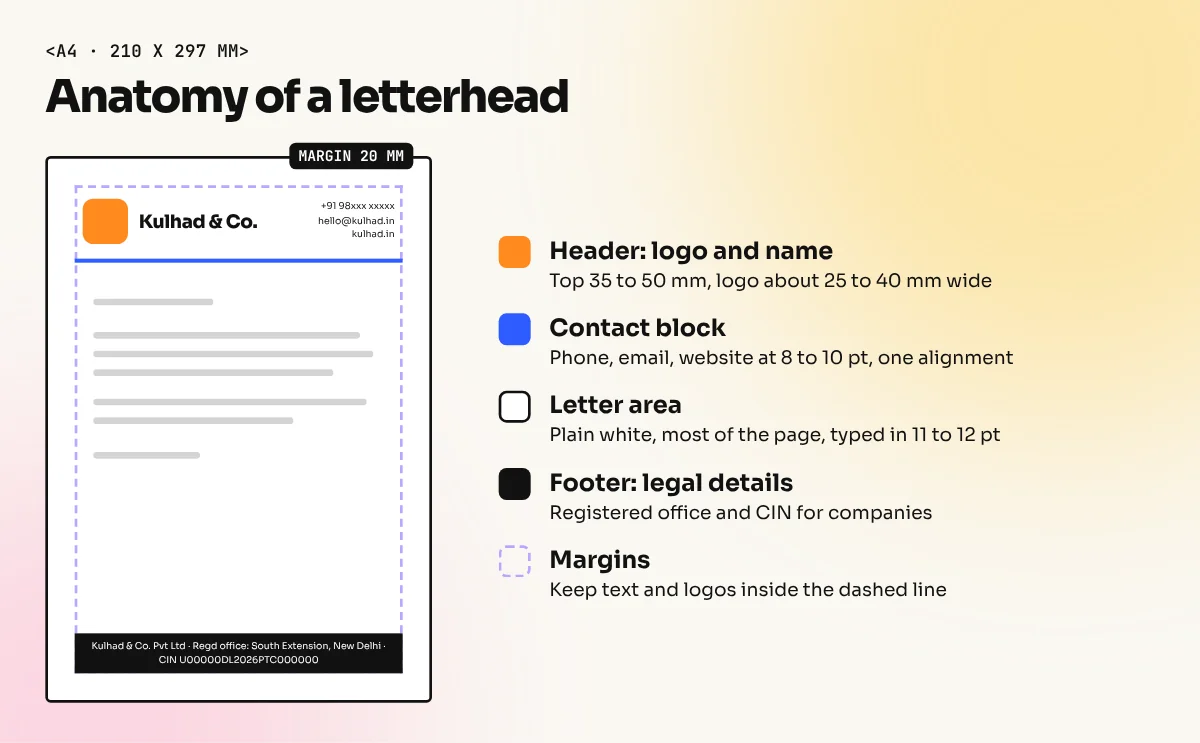
Design the letterhead at A4. Under the ISO 216 standard, A4 is 210 x 297 mm. That is the paper used in nearly every Indian office printer.
| Setting | Recommended value | Why |
|---|---|---|
| Page size | A4, 210 x 297 mm, portrait | Standard office paper in India |
| Side margins | About 20 to 25 mm | Room for the letter and for filing holes |
| Header height | About 35 to 50 mm | Logo and name without eating the page |
| Footer height | About 15 to 25 mm | Address and contact line |
| Bleed (offset printing only) | 3 mm on each side | Colour that runs to the edge is trimmed cleanly |
| Colour mode | CMYK for offset print, RGB for PDF and email | Correct colour on paper and on screen |
| Fonts | One or two, matching the brand | Looks planned and stays readable |
If the letterhead will only be printed on an office laser printer, do not run colour to the edge. Most office printers leave a small white border. Keep every element at least 5 mm inside the page. If you are ordering pre-printed letterheads from a press, add bleed and send a print PDF. Our print-ready file checklist explains bleed, resolution and the final export in detail.
What to include on a letterhead
What you print depends on the type of business. For companies registered under the Companies Act, 2013 there is a legal list. Section 12(3)(c) says every company must print its name, registered office address, Corporate Identity Number (CIN), telephone number, fax number if any, email and website if any on its letterheads, business letters, bills and notices. If the company changed its name in the last two years, the former name must also appear. A One Person Company must print "One Person Company" in brackets below its name.
| Detail | Private limited company | Shop, freelancer or proprietor | School, clinic or NGO |
|---|---|---|---|
| Logo and name | Yes | Yes | Yes |
| Registered office address | Required by law | Business address | Address |
| CIN | Required by law | Not applicable | Registration number if they use one |
| Phone and email | Required by law | Yes | Yes |
| Website | Required if the company has one | If you have one | If you have one |
| GSTIN | Optional on letterhead, needed on invoices | Optional | If registered |
| Tagline | Optional | Optional | Optional |
| Social media handles | Optional | Optional | Optional |
Always ask the client for the exact legal name and CIN in writing. Do not copy them from an old visiting card. A small typing mistake here gets printed on a thousand sheets.
Five letterhead layouts that always work
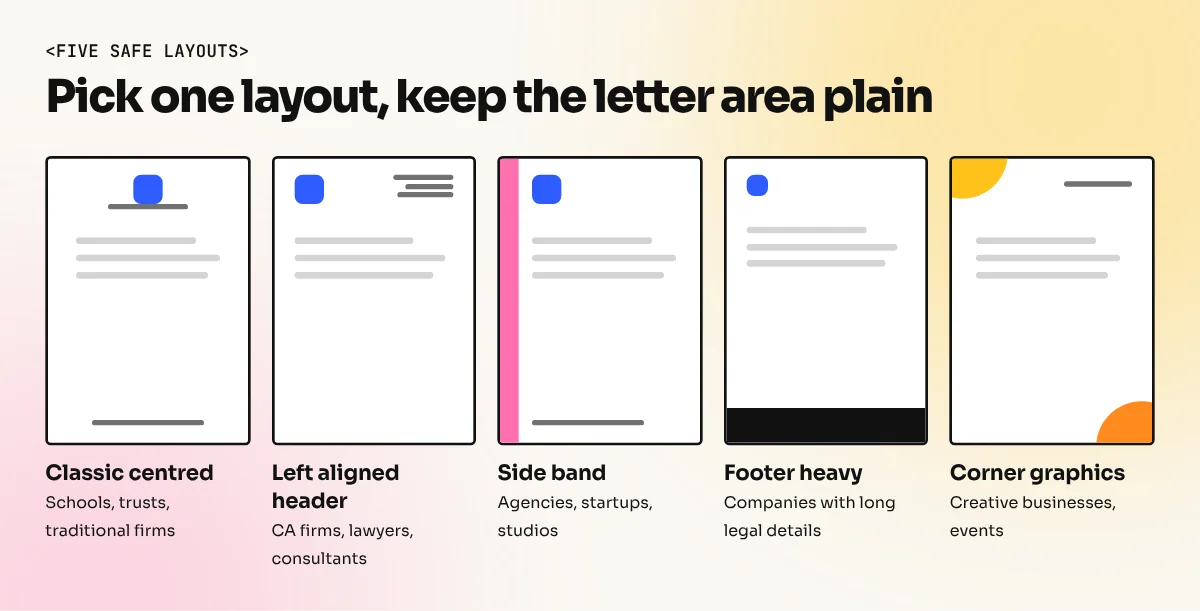
You do not need a new idea for every client. Start from one of these and adapt the colours and shapes from the brand.
| Layout | How it looks | Good for |
|---|---|---|
| Classic centred | Logo and name centred at the top, contact line centred at the bottom | Schools, trusts, traditional firms |
| Left aligned header | Logo on the left, contact details stacked on the right | CA firms, lawyers, consultants |
| Side band | A thin colour strip down the left edge with the logo at the top | Agencies, startups, studios |
| Footer heavy | Small logo at the top, full address and contacts in a colour footer | Companies with long legal details |
| Corner graphics | A brand shape in the top left and the bottom right corners | Creative businesses, events |
Whatever you pick, keep the letter area plain white. Watermarks and big background graphics behind the text make letters hard to read and look poor when photocopied. If you want a watermark, keep it very light, around 5 to 8 percent opacity. Test a printed copy.
How to design a letterhead, step by step
- Collect the details. Legal name, logo files (vector if possible), registered address, CIN, phone, email, website and GSTIN if the client wants it.
- Check the brand. Note the brand colours, fonts and logo rules. The letterhead should match the visiting card and envelope.
- Set up an A4 document. Add margins of about 20 mm. Add 3 mm bleed only if a press will print it.
- Place the logo. Usually top left or top centre, about 25 to 40 mm wide. Do not stretch it.
- Set the contact block. Use 8 to 10 pt text. Group address, phone, email and website. Line them up on one edge.
- Add one brand element. A thin line, a side band or a corner shape is enough. Use the brand colour, not five colours.
- Leave the letter area empty. Type a sample letter in 11 or 12 pt to check that the space feels comfortable.
- Proofread every detail. Check the CIN, phone number and email letter by letter. Ask the client to sign off.
- Export the files. A print PDF for the press, a high quality PDF for email and a Word or Google Docs template for daily use.
Making an editable letterhead in Word
Most staff will never open Illustrator. They need a template where they can just type. The usual method is to design the artwork in Illustrator, CorelDraw or InDesign, export the header and footer as high resolution images (PNG at 300 ppi) and place them in Word.
| Step | In Microsoft Word |
|---|---|
| Set margins | Layout, then Margins, then Custom Margins. Make the top margin large enough to clear the header |
| Add the header | Double click the top of the page and insert the header image |
| Add the footer | Double click the bottom of the page and insert the footer image |
| Only on page one | Tick Different First Page if page two should be plain |
| Lock it | Save as a Word Template (.dotx) so the original stays untouched |
| Share as PDF | File, then Save As, then PDF for letters sent by email |
Set the image wrapping to Behind Text or In Front of Text inside the header so it does not push the body text around. Test with a two page letter to see what happens on page two.
Common letterhead mistakes
| Mistake | Result | Fix |
|---|---|---|
| Logo too large | Header eats a third of the page | Keep the logo around 25 to 40 mm wide |
| Tiny grey contact text | Unreadable after photocopy | 8 pt minimum, dark enough to copy |
| Wrong CIN or old address | Legal and reprint trouble | Get details in writing and proofread |
| Heavy background pattern | Letter is hard to read | Plain white letter area |
| Low resolution logo in Word | Blurry print | Use 300 ppi images or vector PDF |
| Different colours from visiting card | Brand looks inconsistent | Use the same colour codes on all stationery |
A letterhead is usually designed together with the business card. Our guide to visiting card design shows how to carry the same logo, colours and fonts across both.

In the video above, designer Tom of Satori Graphics sets up an A4 letterhead in Illustrator with bleed and margin guides, walks through several popular layout styles and saves the file as a print PDF with outlined fonts.
Letterhead ideas by business type
| Business | Simple idea |
|---|---|
| CA or law firm | Navy and white, serif name, thin rule under the header |
| Clinic or hospital | Calm blue or green, clear phone number and timings in the footer |
| School | Crest centred at the top, school colours in a thin footer band |
| Restaurant or cafe | Warm accent colour, small illustration in one corner |
| Tech startup | Left aligned header, bold sans serif, one bright accent line |
| Wedding planner or event company | Soft colour, elegant script for the name only, plenty of space |
Letterheads teach the basics of all stationery work: hierarchy, alignment, small type and print settings. If you want to draw clean logos and stationery artwork, our Illustrator course covers vector shapes, type and print PDFs. To build full stationery sets, reports and documents with proper page layout, the InDesign course teaches master pages, styles and print-ready export.
Frequently asked questions
What is the standard size of a letterhead in India?
A4, which is 210 x 297 mm under the ISO 216 standard. Almost all offices, printers and laser printers in India use A4, so design the letterhead at that size.
What details must be on a company letterhead in India?
Section 12(3)(c) of the Companies Act, 2013 asks every company to print its name, registered office address, Corporate Identity Number (CIN), telephone number, email and website (if any) on its letterhead. A One Person Company must also show "One Person Company" below its name.
Is GSTIN compulsory on a letterhead?
The Companies Act list does not include GSTIN. GST rules require the GSTIN on tax invoices, not on every letter. Many businesses still add it to the letterhead footer because clients ask for it.
Which software is best for letterhead design?
Illustrator or CorelDraw for the artwork, InDesign for print layouts and Word or Google Docs for the editable version staff will type letters in. Most designers make the artwork first and then place it in a Word template.