Banner Design: Sizes, Layout and Print Tips for Flex and Web Banners
Banner design made simple: common flex sizes in feet, web banner sizes in pixels, a 3-second layout rule, resolution for big prints and a clean print file.
Good banner design starts with the exact size from the printer or the website, then one clear message, one strong image and a short call to action that can be read in about three seconds. Use big, bold type, high contrast and a CMYK file at 100 to 150 ppi at full size for flex prints.
Banner design is the planning of a large, simple graphic that sends one message quickly, either printed on flex or vinyl for a shop, event or hoarding, or shown online as a web banner or cover image. A good banner uses the exact size, one clear headline, one strong image, high contrast and a short call to action. This guide covers common banner sizes in feet and pixels, a layout method that works, resolution for big prints and the file checks printers expect.
In India you see banners everywhere: a Diwali sale flex outside a sweet shop, a coaching centre board in Mukherjee Nagar, a "Grand Opening" banner at a new chai cafe, a website header for an online store. Most of them have the same problem. Too much text, too many colours and a phone number nobody can read from the road. When you learn banner design properly, you learn to cut, simplify and make one idea loud.
What makes a good banner
A banner is not a brochure. People see it for two or three seconds while walking, riding a scooter or scrolling. In that time they should understand three things: what it is, why it matters to them and what to do next.
| Part | Job | Tip |
|---|---|---|
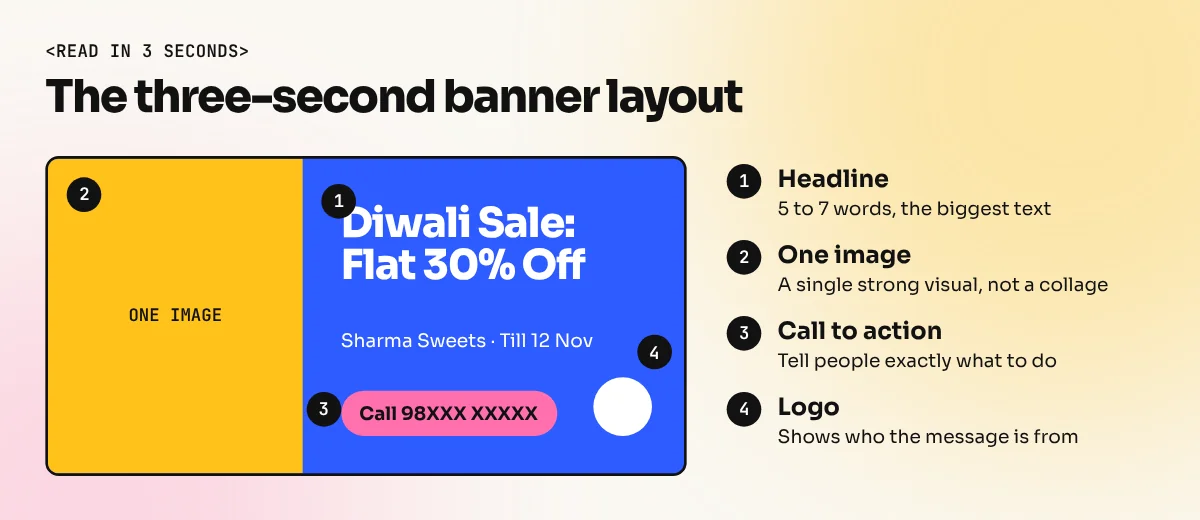
| Headline | Says the main message | 5 to 7 words, the biggest text on the banner |
| Image or visual | Grabs attention | One strong photo or graphic, not a collage |
| Supporting line | Adds one detail | Date, offer or location, smaller than the headline |
| Call to action | Tells people what to do | "Call now", "Visit today", "Shop online" |
| Contact or logo | Shows who it is from | Phone, website or QR code plus the logo |
If you remove any part and the banner still works, remove it. That is the fastest way to make a banner better.
Banner sizes: flex, vinyl and web
The first question is always where the banner will go. Printed banners are measured in feet or inches. Web and social banners are measured in pixels.
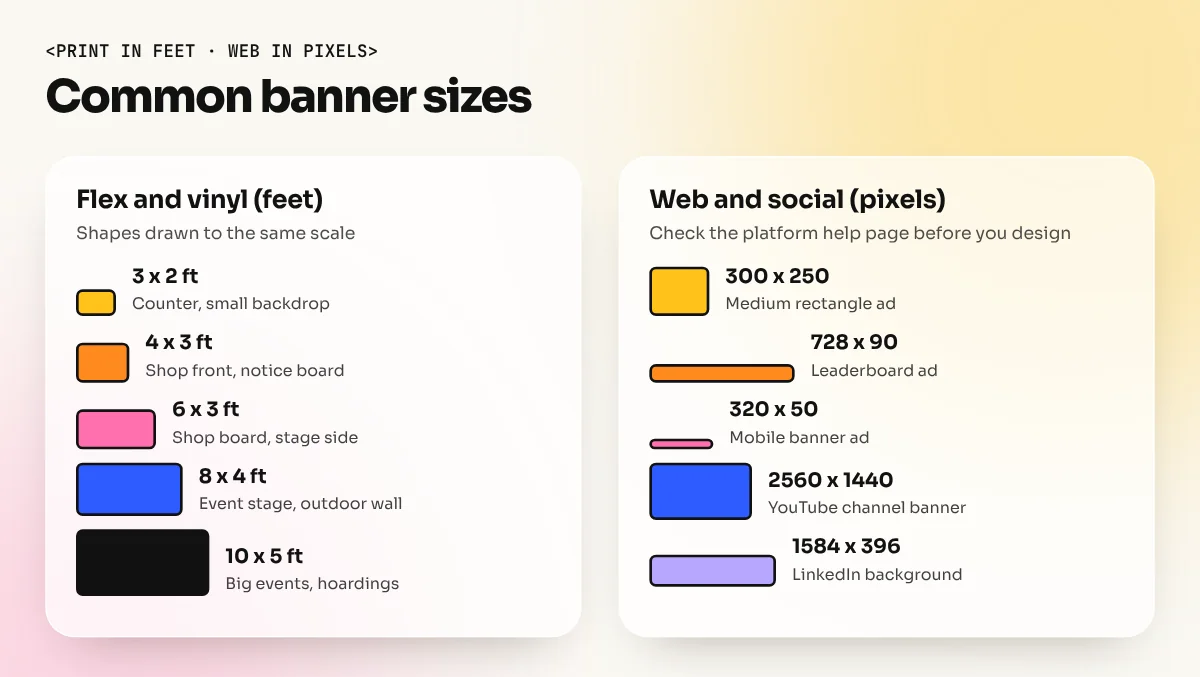
Common printed banner sizes in India
Flex printing in India is usually priced per square foot, so sizes are given in feet. Always measure the wall, frame or stand before you start.
| Size (feet) | Typical use | Design note |
|---|---|---|
| 3 x 2 | Shop counter, small event backdrop | Short headline, large logo |
| 4 x 3 | Shop front, school notice board | Headline plus one image |
| 6 x 3 | Shop board, stage side banner | Wide layout, read left to right |
| 8 x 4 | Event stage, outdoor wall | Headline must read from 10 to 15 metres |
| 10 x 5 and larger | Hoardings, big events | Very few words, huge type |
Ask the printer if they need extra margin for eyelets (the metal rings for ropes), wooden frames or pockets for poles. Many printers ask for a few inches of extra space around the edges. Keep text away from that area.
Common web and social banner sizes
| Where | Size in pixels | Source |
|---|---|---|
| Medium rectangle display ad | 300 x 250 | Google Ads image ad sizes |
| Leaderboard display ad | 728 x 90 | Google Ads image ad sizes |
| Wide skyscraper display ad | 160 x 600 | Google Ads image ad sizes |
| Mobile banner display ad | 320 x 50 | Google Ads image ad sizes |
| YouTube channel banner | 2560 x 1440 (safe area 1546 x 423) | YouTube Help |
| LinkedIn profile background | 1584 x 396 | LinkedIn Help |
Platforms change their sizes from time to time, so check the help page of the platform on the day you design. For posts, stories and other social formats, our guide to social media post sizes lists the full set.
How to design a banner, step by step
These steps work in CorelDraw, Illustrator or Photoshop. Only the menus change.
- Get the brief in writing. The exact size, where the banner will hang, how far people will stand from it and the final text. Ask for the logo in vector format.
- Write the headline first. Before you open any software, cut the client's text down to one headline of five to seven words. "Diwali Sale: Flat 30% Off" works. A paragraph about the shop's history does not.
- Set up the document. For print, create the page at full size if the software allows, or at a scale like 1:10 (a 6 x 3 feet banner becomes 7.2 x 3.6 inches). Tell the printer if you used a scale. For web, set the exact pixel size in RGB.
- Make a rough layout. Decide where the headline, image, call to action and logo will sit. Most banners read left to right or top to bottom. Wide banners often split into two zones: image on one side, text on the other.
- Set big, bold type. Use one strong font for the headline and one simple font for the rest. Thin, script and decorative fonts disappear from a distance.
- Pick high contrast colours. Dark text on a light background or light text on a dark background. Yellow on white and red on dark blue look poor from far away.
- Place the image. One large, clear photo or graphic. Cut out the background if it is busy.
- Add the call to action and contact. Make the phone number big enough to read. A QR code helps on banners people walk up to, not on hoardings seen from a car.
- Check from a distance. Zoom out until the banner is the size of a matchbox on your screen. If you can still read the headline, it will work on the street.
The same thinking is used in poster work. Our guide on how to design a poster goes deeper into headline, image and hierarchy.
How big should text be on a banner
Text size depends on how far people will be when they read the banner. Sign makers often use a simple rule of thumb: about 1 inch of letter height for every 10 feet of viewing distance for basic readability. Go larger for impact. It is a guide, not a law, but it stops the most common mistake of tiny text.
| Viewing distance | Minimum letter height (rule of thumb) | Example |
|---|---|---|
| 10 feet (3 m) | About 1 inch | Banner inside a shop |
| 30 feet (9 m) | About 3 inches | Shop front seen from the road |
| 50 feet (15 m) | About 5 inches | Event banner across a ground |
| 100 feet (30 m) | About 10 inches | Hoarding seen from traffic |
Treat these as the smallest size for supporting text. The headline should be much bigger.
Resolution and file setup for printing
Big banners are viewed from far away, so they do not need the 300 ppi used for brochures and cards. Many large-format printers ask for about 100 to 150 ppi at the final size. Hoardings seen from the road can work with even less. A 6 x 3 feet banner at 150 ppi is about 10,800 x 5,400 pixels, which is already a heavy file, so planning matters.
- Keep text and logos in vector. In CorelDraw or Illustrator, type and shapes stay sharp at any size. Convert text to curves or outlines before sending.
- Check photos at the final size. A photo that looks fine on Instagram may be only 1080 pixels wide. Stretched across 6 feet, it will look blurry.
- Use CMYK for print. Flex printers print with CMYK inks. Bright RGB blues and greens will look duller on flex, so convert and check the colours before you export.
- Add the printer's margin. If they need extra space for eyelets or framing, add it as a background extension and keep text clear of it.
- Export the right file. Most flex printers accept PDF, CDR, high quality JPG or TIFF. Ask before you export. Name the file with the size, for example
diwali-sale-6x3ft.pdf. - Ask for a small proof. For big or costly jobs, ask the printer to print a small section at full size so you can check colour and sharpness.
For web banners, export in RGB as JPG or PNG and keep the file light. Google Ads lists a file size limit for uploaded image ads, so check the current limit on its help page before you export.
Flex, vinyl and other banner materials
| Material | What it is | Good for | Design tip |
|---|---|---|---|
| Frontlit flex | Standard flex lit from the front | Shop boards, events, outdoor banners | Most common and low cost, keep colours bold |
| Backlit flex | Thinner flex lit from behind | Glow sign boards | Avoid very dark areas, light must pass through |
| Star flex | Better quality flex with smoother finish | Indoor and premium outdoor banners | Shows finer details and photos better |
| Vinyl | Adhesive sheet | Glass doors, walls, vehicles | Keep a clear area for the door handle or glass edge |
| Fabric | Printed cloth | Exhibitions, stage backdrops | Colours look softer, test a sample |
Material names and quality vary from printer to printer, so ask for samples and the exact material code before you promise a client a finish.
Common banner design mistakes
| Mistake | Result | Fix |
|---|---|---|
| Too much text | Nobody reads it | One headline, one line, one action |
| Small phone number | Customers cannot call | Make contact details clearly visible |
| Low resolution photos | Blurry, pixelated print | Check pixel size at full banner size |
| Five or more colours | Looks loud and messy | Use two brand colours plus black or white |
| Thin or script fonts | Unreadable from a distance | Bold sans serif for headlines |
| Text in the eyelet margin | Words get cut or punched | Keep a safe margin all around |
| RGB file sent for print | Dull, flat colours | Convert to CMYK and check |
Banner work is one of the most common paid jobs for a new designer in India, from local shops to schools and events. It trains you to make a message loud and simple. Our Photoshop course covers photo editing, cut outs and colour for banners built around images. The CorelDraw course teaches the vector layouts and print files that flex printing shops in Delhi use every day.
Frequently asked questions
What is the standard size of a flex banner?
There is no single standard. Indian print shops sell flex by the square foot and common sizes are 3 x 2, 4 x 3, 6 x 3, 8 x 4 and 10 x 5 feet. Measure the wall or frame first and ask the printer about extra margin for eyelets or framing.
Which software is best for banner design?
CorelDraw is the most common choice in Indian flex printing shops and Adobe Illustrator is common in agencies. Photoshop is used when the banner is built around photos. For simple web banners and social covers, Canva also works if you set the exact size.
What resolution should a flex banner be?
Large banners are seen from far away, so you rarely need 300 ppi at full size. Many large-format printers ask for about 100 to 150 ppi at the final size and less for hoardings seen from the road. Ask your printer and keep text and logos in vector form.
How many words should a banner have?
As few as possible. A headline of five to seven words, one supporting line, a phone number or website and a logo are enough for most banners. People see a banner while walking or driving, so long text is simply not read.