How to Build a Behance Portfolio That Gets Noticed
Build a Behance portfolio step by step: profile setup, project structure, image sizes, cover tips and the mistakes that keep good work from being seen.
A Behance portfolio is a free online showcase of design projects on Adobe's Behance platform. To build one, set up a clear profile, publish 6 to 10 strong projects as short case studies with the brief, process and final work, use a sharp 808 x 632 pixel cover and add tags and tools so the right people find you.
A Behance portfolio is a free online showcase where designers publish their projects as visual case studies on Behance, the creative platform owned by Adobe. Recruiters, studios and clients across India browse it to shortlist designers. A good profile often gets you calls that a resume alone would not. Building one is simple; building one that gets noticed takes a plan. This guide walks you through profile setup, how to structure each project, the exact image sizes Behance uses, cover image tips and the mistakes that keep good work hidden.
Why designers use Behance
Behance is not the only place to show work, but it has three clear advantages for a graphic designer starting out:
- It is free. According to Behance's own help pages, sharing work, being discovered and being featured in galleries are free for everyone. Featuring depends on the quality of the work, not on a paid plan.
- Recruiters already look there. Many hiring managers ask for "a Behance link" in job posts because it is quick to browse.
- It shows process, not just pictures. A Behance project is a long scrolling page, so you can show the brief, sketches, options and final result in one place.
| Option | Cost | Best for | Limitation |
|---|---|---|---|
| Behance profile | Free | Being found, sharing a link with recruiters | Shared layout; you cannot design the whole site |
| Personal website | Domain and hosting cost | Full control of design and branding | Nobody finds it unless you share it |
| PDF portfolio | Free | Emailing to a specific studio | Heavy files, no discovery |
| Free | Quick visual posts, building a following | Hard to show process; square crops |
Most working designers use Behance plus a PDF. If you have not built your first projects yet, start with our guide to building a graphic design portfolio with no experience, then come back to publish them here.
Step 1: Set up a profile that looks hireable
Your profile is the first thing a recruiter sees, before any project.
- Photo: a clear, friendly photo of your face. Not a logo, not a cartoon.
- Name and title: your real name and a specific title, such as "Graphic Designer, Branding and Packaging" rather than "Creative Soul".
- Location: add your city, for example New Delhi. Many studios search for local designers.
- About section: three or four lines. Who you are, what you design, which tools you use and what kind of work you want.
- Banner: a simple banner made from your own work or a clean colour. Avoid busy collages.
- Contact and availability: add a professional email and turn on the hiring and freelance options if you are open to work.
Step 2: Choose which projects to publish
Six to ten strong projects beat thirty average ones. A recruiter will look at your top three or four and decide in a few minutes.
Aim for a mix that shows range but still points to the job you want:
| Project type | Why include it | Example idea |
|---|---|---|
| Brand identity | Shows thinking, not just tools | Logo, colours and stationery for a Delhi bakery |
| Packaging | Popular with FMCG and D2C brands | Label and box for a masala or tea brand |
| Social media campaign | Most entry-level jobs need it | 9-post Instagram campaign for a festive sale |
| Poster or print | Shows layout and typography | Event poster series for a college fest |
| Photo manipulation | Shows Photoshop skill | Product ad with composited background |
| Editorial or brochure | Shows multi-page layout | 8-page brochure for a coaching centre |
If you want branding jobs, lead with two or three branding projects. If you want social media roles, lead with campaigns. Your first projects decide how people label you.
Step 3: Structure each project as a short case study
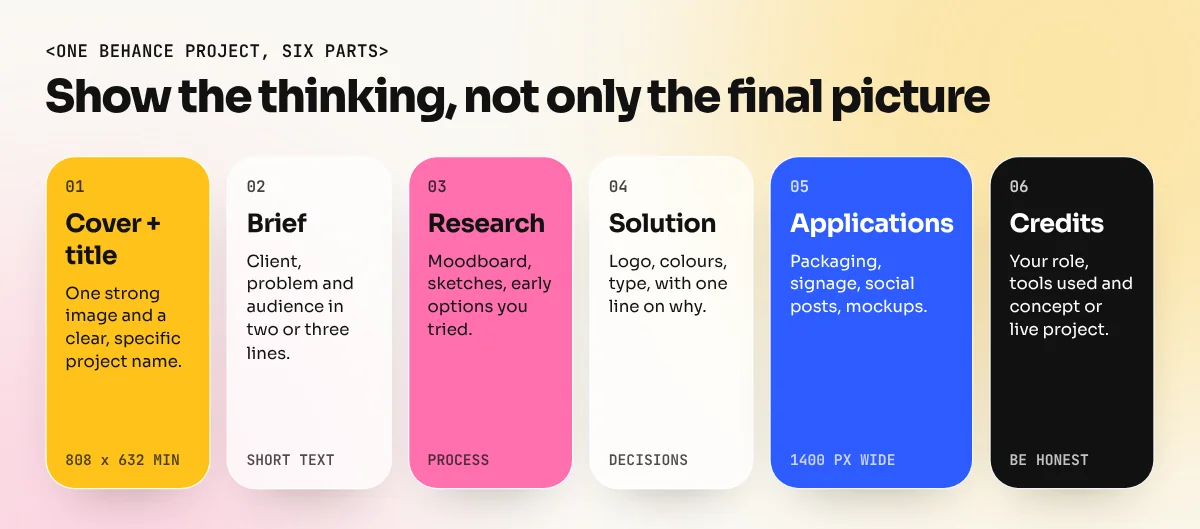
A project with only a final image says "I can use software". A project with a short story says "I can solve problems". Use this order:
- Title: clear and specific, such as "Chai Kulhad Café: Brand Identity". Behance requires a title to publish.
- The brief: two or three lines on the client (real or concept), the problem and the audience.
- Research and sketches: a moodboard, early sketches or rejected options.
- The solution: the logo, colours and type, with one line on why you chose them.
- Applications: the design in use: packaging, signage, social posts, mockups.
- Credits and tools: your role, the tools used (Photoshop, Illustrator, InDesign) and whether it is a concept or live project.
Keep text short. Most people scroll the images and read only the headlines, so put your key point in the first line of each text block.
Step 4: Get the image sizes right
Blurry or tiny images are the most common reason good projects look weak. These numbers come from Behance's help centre:
| Item | Behance guidance |
|---|---|
| Project image width | Shown at 1400 px wide; narrower images get side padding |
| Sharp zoom (lightbox) | Up to 2800 px wide |
| File size | 10 MB or less recommended; 50 MB is the hard limit |
| File types | JPEG (recommended), PNG and GIF |
| Not accepted | PDF, PSD and DOC files |
| Colour | CMYK images are converted to RGB, so colours can shift; export in RGB |
| Cover image | Minimum upload size 808 x 632 px |
| GIFs | Allowed inside projects, not as covers |
A practical workflow in Photoshop: create artboards 1400 px wide, design your project as a series of tall panels, then export each panel as a high-quality JPEG in sRGB. Export a 2800 px version if you want details to stay sharp when people zoom in.
Step 5: Make the cover image work at thumbnail size
Your cover appears as a small card in feeds and search results, next to dozens of other projects. It decides whether anyone clicks.
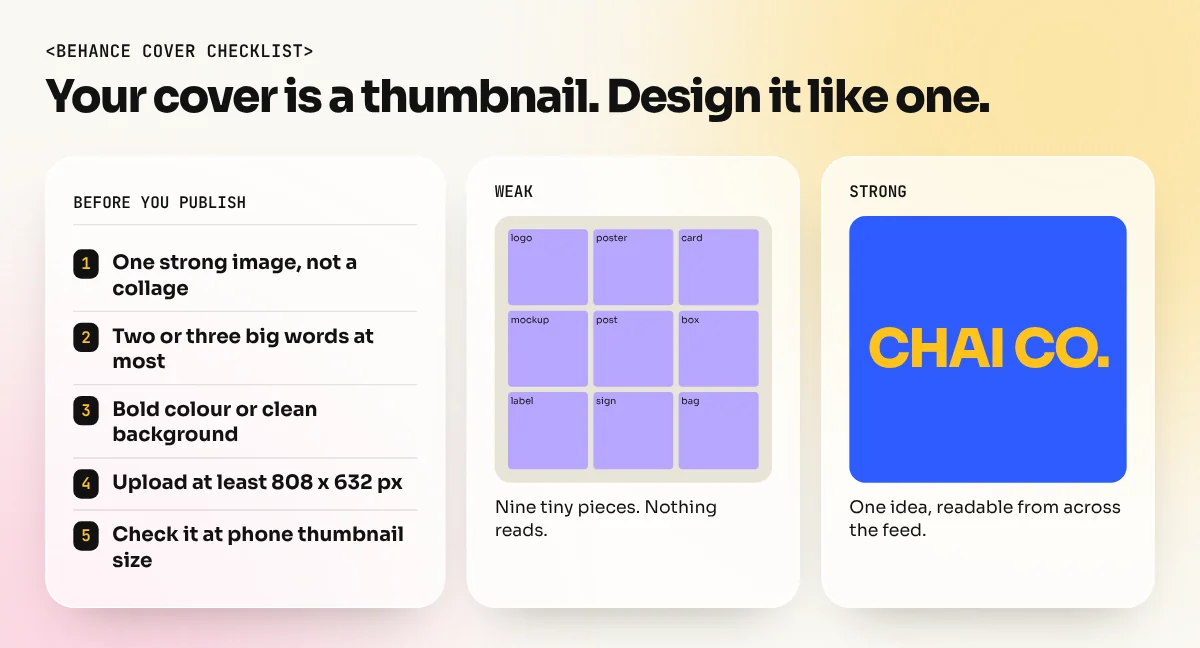
- One strong image. Show the best single view of the project, not a collage of everything.
- Readable at a glance. If there is text, keep it to two or three big words. Small text disappears at thumbnail size.
- Contrast with the feed. A bold colour or a clean background helps the card stand out.
- Upload at least 808 x 632 px and crop carefully with Behance's crop slider so nothing important is cut.
- Test it small. Shrink your cover to the size of a phone thumbnail. If you cannot tell what it is, simplify it.
Step 6: Help the right people find your work
Publishing is half the job. These settings help your project reach the right viewers:
- Creative fields: choose the closest fields, such as Graphic Design, Branding or Packaging.
- Tags: add specific, honest tags people really search: "logo design", "packaging design", "tea branding", "Indian branding".
- Tools used: list the software. Recruiters often filter by tool.
- Publish regularly. A new project every month or two keeps your profile active and gives you fresh links to share.
- Share the link everywhere. Put your Behance URL on your resume, LinkedIn profile and email signature. Our graphic designer resume guide shows where the portfolio link should go.
- Engage honestly. Appreciate and comment on work you like. Other designers often follow back and your name becomes familiar.
Is Behance Pro worth paying for?
Behance Pro is an optional paid plan. According to Behance's help centre, it adds zero platform fees on freelance and asset sales, some exclusive freelance job listings, extra project settings such as scheduled publishing and link-only sharing, advanced Adobe Portfolio features, Adobe Fonts and 100 GB of cloud storage. Behance says pricing varies by region and commitment.
For a student or fresher, the free plan is enough. Being featured depends on the quality of your work, not on paying. Consider Pro only when you start selling services or assets on Behance and the fees saved are more than the subscription.
Mistakes that keep good work hidden
| Mistake | Fix |
|---|---|
| Uploading every class exercise | Publish only finished, strong projects |
| Final image only, no story | Add a short brief, process and result |
| Tiny or blurry images | Export at 1400 px wide in RGB |
| Cover with small text | One bold image, two or three big words |
| Using other people's photos or fonts without a licence | Use your own photos, licensed stock and free-for-commercial-use fonts |
| Posting client work without permission | Ask first or present it as a concept project |
| Profile title "Freelancer" with no focus | Name your specialty: branding, packaging, social media |
The bottom line
A Behance portfolio is your free shop window as a designer. Set up a clear profile, publish six to ten strong projects as short case studies, export images at 1400 px wide, make each cover readable at thumbnail size and tag your work honestly. Then share the link everywhere you apply.
If you need strong projects to fill it, the 6-month graphic design diploma is built around portfolio projects with real briefs. A Photoshop course helps you create the mockups, composites and clean exports that make a Behance project look professional.
Frequently asked questions
Is Behance free for graphic designers?
Yes. Creating a profile, publishing projects and appearing in Behance galleries are free. Behance Pro is an optional paid plan that adds extras such as zero platform fees on sales and scheduled publishing.
How many projects should a Behance portfolio have?
Six to ten strong projects is a good start. Quality matters more than count. Remove old or weak work as you add better projects.
What size should Behance project images be?
Behance shows project images at 1400 pixels wide, so export at 1400 px wide (or up to 2800 px for sharp zoom). Keep each file under 10 MB and use JPEG or PNG.
Can I put client work on Behance?
Only with permission. Ask the client first, remove private data and mention if the work is a concept or student project rather than a live job.