How to Design a Book Cover: Layout, Type and Print
A practical book cover design guide: genre research, layout, title type, front, spine and back setup, eBook sizes and print-ready PDF rules. Simple steps.
Book cover design means creating the front, spine and back of a book so it signals the genre, shows the title clearly even as a small thumbnail and prints correctly. Study covers in the same genre, choose one strong image or idea, set a bold readable title, then build a full wrap file with spine width and bleed.
Book cover design is creating the front, spine and back of a book so that it tells readers the genre, shows the title clearly and prints without errors. People really do judge a book by its cover. On a shop table or an online store, the cover has a second or two to say "this is a thriller" or "this is a self-help book for you". This guide shows you how to design a book cover step by step: research, idea, layout, typography and the print setup that many beginners get wrong.
What a book cover has to do
A cover is not an illustration of the story. It is packaging for the book. It has three jobs.
| Job | What it means | Common mistake |
|---|---|---|
| Signal the genre | A reader should guess the category in one look | A romance novel that looks like a horror book |
| Show the title and author | Readable at full size and as a tiny thumbnail | Thin, fancy fonts that disappear online |
| Make people curious | One image or idea that raises a question | Showing five scenes from the plot |
Most books today are first seen online, as a thumbnail about the size of a postage stamp. So test every cover small. If the title cannot be read at that size, the cover is not finished.
Step 1: Research the genre
Before you sketch, collect 20 covers of recent bestsellers in the same genre and language. Lay them out side by side. You will see patterns quickly.
| Genre | Common visual signals |
|---|---|
| Thriller and crime | Dark colours, a lone figure or object, big bold sans serif titles |
| Romance | Warm or pastel colours, a couple or illustrated characters, script or soft serif type |
| Self-help and business | Plain bright background, huge title, small icon or none |
| Literary fiction | Artistic image or pattern, elegant serif type, lots of space |
| Children's books | Bright illustration, playful hand-drawn lettering |
| Indian mythology | Rich colours, gold accents, ornament or a dramatic figure |
The goal is not to copy. It is to fit in enough that readers know the genre, then stand out with one fresh idea. This balance between "familiar" and "different" is the heart of cover design.
Step 2: Find one strong idea
Read the brief or the book summary and list the key words: setting, mood, main object, main question. Then sketch at least ten small thumbnails, each the size of a stamp. Try different approaches:
- Object: one symbolic object, such as a broken bangle for a family drama.
- Figure: a person seen from behind or in silhouette, which lets readers imagine the hero.
- Place: a mood-setting setting, like a foggy Delhi street at night.
- Type only: a huge, clever title treatment, common for non-fiction.
- Pattern or illustration: a hand-made style for literary or children's books.
Pick two ideas and show them to the client or a few readers in the target group. Ask, "What kind of book is this?" If they guess the genre right, you are on track.
Step 3: Lay out the front cover
Most good front covers follow a clear order of reading: title, image, author, then a short line such as a quote or "A Novel". Keep a simple grid and plenty of margin.
- Title: the biggest element on most covers. Place it where the image is calm, usually top or bottom third.
- Author name: smaller for a first-time author, sometimes as big as the title for a famous one.
- Image: one focal point. Remove anything that does not help the idea.
- Extra text: at most one line, like a short review quote or "Bestselling author of...".
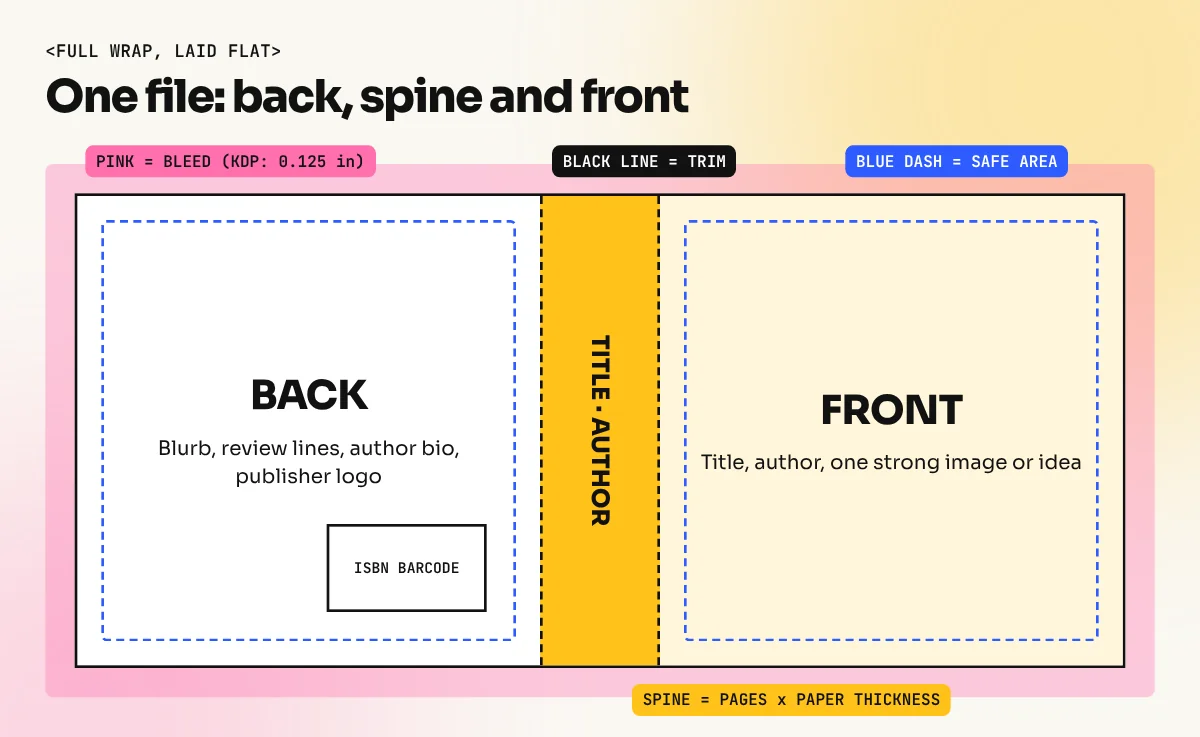
Leave a margin around all text. Amazon KDP, for example, asks that front and back cover text stay at least 0.125 inches inside the trim line. Our guide to layout design explains grids, margins and visual order in more detail.
Step 4: Choose the typography
Type does more work on a cover than most beginners expect. Follow a few rules:
- Use one or two typefaces at most. One for the title, one for the author and small text.
- Match the font mood to the genre: condensed bold sans serifs for thrillers, elegant serifs for literary fiction, rounded or hand-drawn letters for children's books.
- Make the title thick enough to read as a thumbnail. Very light weights look classy at full size and disappear online.
- Use strong contrast between text and background. Add a darker area behind the title if the photo is busy.
- Check the font licence allows use on a commercial product like a printed book.
For Hindi or bilingual covers, choose a Devanagari typeface designed properly for the script, not a Latin font with a fake Hindi look. Check every matra and conjunct with the author.
Step 5: Set up the spine and back cover
A printed book needs a full wrap: back cover, spine and front cover as one flat file. To size it you need three things from the printer: the trim size (for example 5.5 x 8.5 inches or 6 x 9 inches), the page count and the paper type.
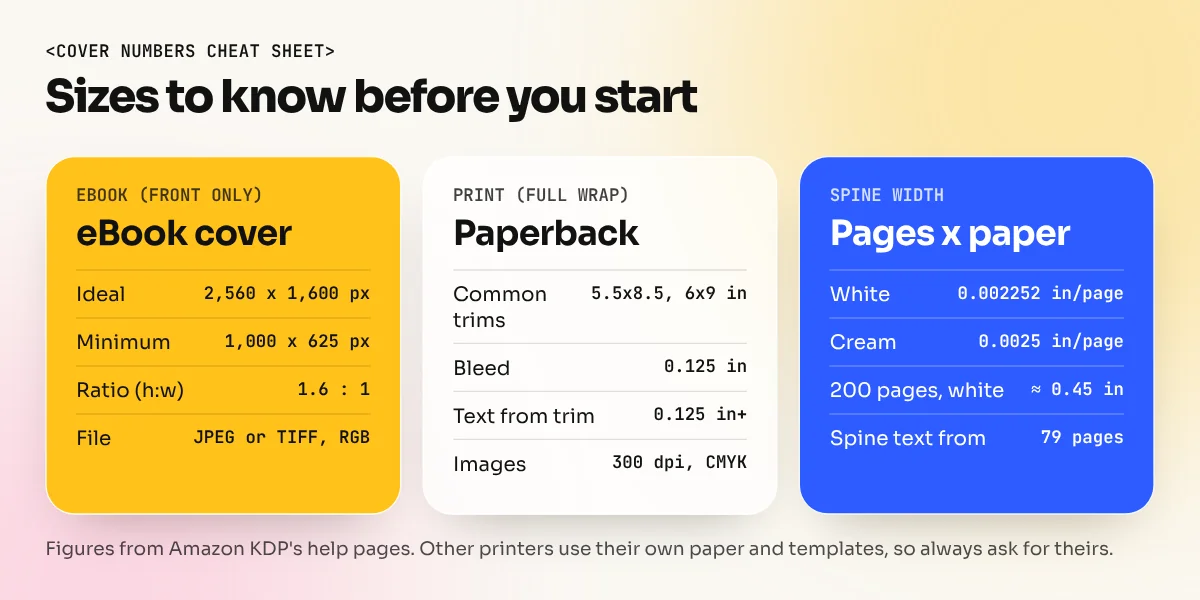
Spine width is page count multiplied by paper thickness. Amazon KDP's cover guidance gives these values:
| Paper (KDP) | Thickness per page | Spine for 200 pages |
|---|---|---|
| White | 0.002252 inches | About 0.45 inches |
| Cream | 0.0025 inches | 0.5 inches |
| Premium colour | 0.002347 inches | About 0.47 inches |
KDP also says spine text needs a book of at least 79 pages. Spine text should stay at least 0.0625 inches from the spine edges. Other printers use their own paper, so always ask for their spine calculator or template.
The back cover usually holds a short blurb (100 to 200 words), a few review lines, an author photo or short bio, the publisher's logo and the barcode. Leave a clear white area for the ISBN barcode in the lower part of the back, as the printer specifies. In India, ISBNs are issued by the Raja Rammohun Roy National Agency for ISBN under the Ministry of Education, through its online portal. The publisher or author gets the number. You only place the barcode.
Step 6: Export print and eBook files
Print and eBook covers need different files.
Print cover (full wrap):
- Total width = back + spine + front + bleed on the outer edges. KDP asks for 0.125 inches of bleed on the top, bottom and outside edges.
- Images at 300 dpi at final size. KDP also asks for CMYK images in the print file.
- Background colour and images extended into the bleed.
- Text inside the safe area.
- Fonts embedded and the file exported as a single print PDF.
eBook cover (front only): Amazon KDP gives an ideal size of 2,560 pixels high by 1,600 pixels wide, a minimum of 1,000 x 625 pixels, as a JPEG or TIFF file in RGB. No spine or back cover is needed.
InDesign is the easiest tool to assemble the wrap because you can set the exact document size, guides for the spine and bleed and export a print PDF with the right settings. Our InDesign course covers these print setups and the Photoshop course covers photo editing, blending and colour work for image-led covers.
A cover project for your portfolio
Book covers are a great portfolio project because they show concept, image making, typography and print setup. Try this:
- Pick three books from different genres that you have read, for example a crime novel, a self-help book and a children's story.
- Redesign each cover. Show the front as a thumbnail and at full size, plus one full wrap with spine and back.
- Write two lines on each: the genre signals you used and the one idea that makes it different.
Recruiters at publishing houses and agencies like seeing range. Add these to your folio the way we explain in our guide to a graphic designer portfolio with no experience. Mark redesigns clearly as personal projects, not real commissions.
The bottom line
A strong book cover design signals the genre, shows a readable title even as a thumbnail and prints without surprises. Research the shelf, find one idea, keep the layout and type simple, then build the full wrap with the exact spine and bleed the printer needs. Get these basics right and your covers will look professional on any shelf or screen.
Frequently asked questions
Which software is used for book cover design?
Photoshop is used for photo-based and painted covers, Illustrator for vector and type-led covers and InDesign to assemble the full wrap with exact sizes, spine and bleed before exporting a print PDF. Many designers use two of these together.
What size should a book cover be?
It depends on the trim size of the book. For a printed book the file covers the back, spine and front plus bleed, so you need the trim size, page count and paper type from the printer. For eBooks, Amazon KDP gives an ideal size of 2,560 x 1,600 pixels (height x width).
How do you calculate spine width?
Multiply the page count by the paper thickness per page given by the printer. For example, Amazon KDP lists 0.002252 inches per page for white paper and 0.0025 inches for cream paper. A 200-page book on white paper has a spine of about 0.45 inches.
Can a beginner design a book cover?
Yes, if you keep it simple. One strong image, one clear title font and good contrast beat a crowded cover. Practise by redesigning covers for books you have read and by making covers for friends who self-publish.