Packaging Design Basics: From Dieline to Shelf
Learn packaging design step by step: the brief, dieline, front panel, label rules in India, print finishes and files. Simple examples for beginners.
Packaging design is planning how a product's box, pouch, bottle or label looks and works. A good pack is built on a dieline (the flat cut-and-fold template), shows the brand and product clearly on the front panel, carries every legal detail on the back and is set up in CMYK with bleed so it prints and folds correctly.
Packaging design is the work of planning how a product's box, pouch, bottle or label looks, reads and works. A good pack does three jobs at once: it protects the product, it sells it in about three seconds on a crowded shelf and it carries every detail the law and the buyer need. This beginner's guide to packaging design walks through the full process, from the client brief and the dieline to the front panel, label rules in India, print finishes and final files.
What packaging design really includes
Many beginners think packaging design means "making the box look pretty". In practice a packaging designer handles four layers of work.
| Layer | What it means | Example |
|---|---|---|
| Structure | The shape and the way it opens | A tuck-end box for a soap, a stand-up pouch for namkeen |
| Brand | Logo, colours, type, pattern | The same red and gold across a whole range of sweets |
| Information | What the buyer must read | Flavour, weight, MRP, ingredients, veg mark |
| Production | How it is printed and finished | CMYK, spot colour, foil, matt lamination |
Large brands often hire a structural designer for the shape and a graphic designer for the artwork. In small businesses, like a Delhi spice brand or a local bakery, one graphic designer usually does everything. That is why learning the full flow is useful.
Step 1: Read the brief and study the shelf
Before you open any software, answer these questions with the client:
- What is the product and who buys it? A kulhad chai premix for office workers needs a different feel from a kids' snack.
- Where will it sell? A kirana shelf, a supermarket, a quick-commerce app or a gift shop. On apps, the pack is seen as a small thumbnail, so the front must work at a tiny size.
- What is the pack type and size? Box, pouch, jar label, sleeve, carry bag. Get the exact size from the printer or the client.
- What is the budget for print? This decides the number of colours and finishes.
- Who are the competitors? Visit a store or open a shopping app and photograph ten packs in the same category.
That last step matters. If every masala brand uses red and yellow, a calm green pack may stand out. If every premium chocolate uses dark brown, a bright pack may look cheap. You only learn this by looking at the real shelf.
Step 2: Get the dieline before you design
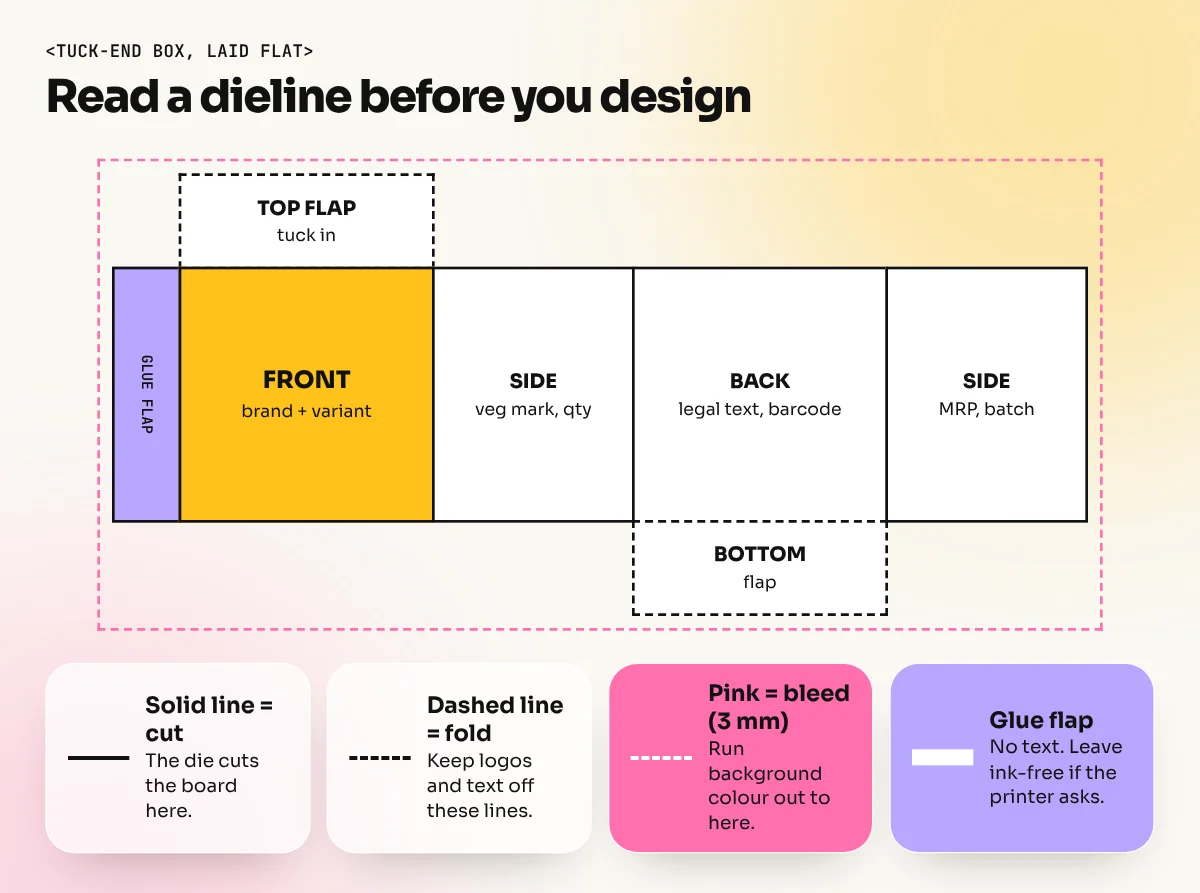
A dieline is the flat template of the pack. It shows where the printer's cutting die will cut, where the board will fold and where it will be glued. You place your artwork on top of it.
Always ask the printer for their dieline first. Every machine and board thickness is slightly different, so a template downloaded from the internet may not fold properly on their line.
| Line on the dieline | Usual style | What it means |
|---|---|---|
| Cut line | Solid line | The die cuts here |
| Fold or crease line | Dashed line | The board folds here |
| Bleed line | Outside the cut, often 3 mm | Extend background colour up to here |
| Safe line | Inside the cut, often 3 to 5 mm | Keep text and logos inside this |
| Glue area | Marked flap | Keep it free of ink or varnish if the printer asks |
Put the dieline on its own locked layer in Illustrator, set as a spot colour named "Dieline" and set to overprint. Then the printer can switch it on or off cleanly. Never merge it into your artwork.
Step 3: Design the front panel first
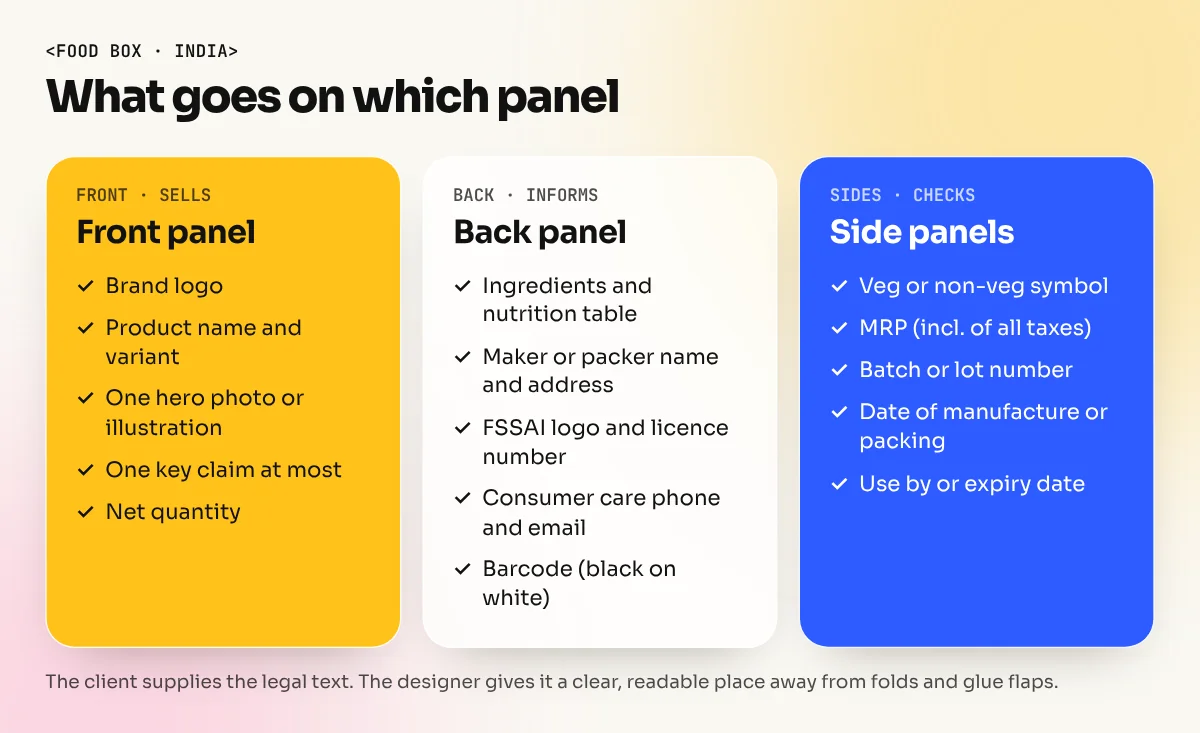
The front panel (often called the principal display panel) is the face the buyer sees on the shelf. It has to answer three questions very fast: What brand is this? What product is it? Why should I pick it?
Use a clear order of reading:
- Brand logo in a fixed position across the whole range.
- Product name and variant in the biggest, clearest type, for example "Masala Chai" or "Elaichi".
- One hero visual: a product photo, an illustration or a strong pattern.
- One key claim at most, like "No added sugar" or "Hand-roasted". Too many badges make a pack look cheap and confused.
- Net quantity where the law needs it on the display side.
A good test: print the front at real size, put it on a shelf next to competitors, step back two metres and look for three seconds. If you cannot read the brand and the variant, simplify. This is the same idea of visual order we explain in our guide to the principles of graphic design.
Design a range, not a single pack
Clients rarely sell one pack. They sell flavours or sizes. Build a system: the logo, layout and type stay the same, while one element changes, such as the colour band or the illustration. A buyer should spot "the same brand, different flavour" at once.
Step 4: Plan the back and side panels
The back and side panels carry the information. Clean type here builds trust. In India, two sets of rules matter most.
Legal Metrology (Packaged Commodities) Rules, 2011. These rules list declarations for pre-packed goods sold at retail. Common ones include:
- Name and address of the manufacturer, packer or importer
- Common or generic name of the product
- Net quantity in standard units
- Month and year of manufacture, packing or import
- Maximum retail price (MRP), inclusive of all taxes
- Consumer care details such as phone and email
- Country of origin for imported goods
- Unit sale price where it applies
FSSAI Labelling and Display Regulations, 2020 (for food). Food packs add items such as the list of ingredients, nutrition information, the FSSAI logo with licence number, batch or lot number, date marking and the veg or non-veg symbol. FSSAI describes the veg mark as a green filled circle inside a green square and the non-veg mark as a brown filled triangle inside a brown square.
Your job as a designer is not to decide the legal text. The client and their compliance person supply it. Your job is to give it a clear, readable place, at the minimum sizes the rules ask for and never to hide it under folds, seams or glue flaps.
Two more items usually live on the back:
- Barcode. In India, brands get official retail barcodes through GS1 India. Keep the barcode black on white or a light colour, at the size the client provides and away from folds.
- Recycling and disposal marks the client asks for.
Step 5: Choose colours, materials and finishes
Packaging is printed, so think in print terms from the start.
| Choice | Options | Designer's tip |
|---|---|---|
| Colour mode | CMYK, or CMYK plus a spot (Pantone) colour | Use a spot colour when the brand colour must match exactly on every batch |
| Board or film | Paper board, kraft, corrugated, laminated film for pouches | Kraft makes colours look darker and warmer. Test it |
| Finishes | Matt or gloss lamination, spot UV, foil, emboss | Use one special finish on one element, like the logo |
| White ink | Needed on clear or metallic film | Make a separate white layer as the printer asks |
Black text on the back should be pure black (100% K), not a rich mix of four colours. Small type in four colours can look blurred if the plates move slightly.
Step 6: Mock up, check and hand over print files
Before the client signs off, show the pack in 3D. You can wrap the flat artwork on a box mock-up in Photoshop, or simply print it on a home printer, cut it and fold it. Folding a paper sample catches many errors: upside-down text on the top flap, a logo cut on a fold, a barcode on the glue flap.
Then prepare the final files with this checklist:
- Artwork in CMYK (plus named spot colours if used).
- Background extended to the bleed line on every side.
- All text and logos inside the safe line.
- Fonts converted to outlines or embedded in the PDF.
- Images at 300 ppi at the final print size.
- Dieline on its own layer, named, in a spot colour set to overprint.
- A print-ready PDF in the format the printer asks for, plus the open Illustrator file.
- A printed or digital proof approved and signed by the client.
Ask for a physical proof from the printer for any big run. Colours on screen and on board are never exactly the same.
Software and skills you need
Most packaging work happens in Adobe Illustrator, because dielines, logos and patterns need exact vector shapes. Photoshop handles product photos, retouching and 3D mock-ups and many Indian print shops also accept CorelDRAW files. If you are new to the tools, our comparison of Photoshop vs Illustrator vs Canva explains which one does what.
Beyond software, packaging design uses almost every core design skill: brand thinking, typography at very small sizes, layout on odd shapes and real print knowledge. That is why it makes such a strong portfolio piece. In our Adobe Illustrator course you practise dielines and vector artwork and in the 6-month graphic design diploma packaging is one of the full brand projects you build for your portfolio.
A practice brief you can try this week
Design a three-flavour range for an imaginary Delhi brand called "Chai Wale Bhaiya": Masala, Elaichi and Ginger, in 250 g tuck-end boxes.
- Ask a local printer for a box dieline, or draw a simple one yourself.
- Keep the logo and layout the same and change only the colour band and the spice illustration.
- Add a realistic back panel with placeholder text for net quantity, MRP, ingredients and the veg mark.
- Print, cut and fold all three. Photograph them together on a shelf.
When you present it, show the flat dieline, the folded boxes and one line about why you made each choice. If you are building your first portfolio, our guide to a graphic designer portfolio with no experience shows how to turn a practice brief like this into a case study.
The bottom line
Good packaging design is clear thinking made physical. Start with the brief and the real shelf, design on the printer's dieline, make the front panel readable in three seconds, give legal details a clean home and set up files the way the printer needs. Do that and your packs will look good in the store and in your portfolio.
Frequently asked questions
Which software is used for packaging design?
Most packaging designers draw the dieline and artwork in Adobe Illustrator, because it gives exact vector shapes, layers for cut and fold lines and print-ready PDFs. Photoshop is used for product photos and mock-ups. CorelDRAW is also common in many Indian print shops.
What is a dieline in packaging design?
A dieline is the flat template of a box or label that shows where the printer will cut, fold and glue. It usually has solid lines for cuts, dashed lines for folds and a bleed area around the outside. You place all artwork on top of it.
What must be printed on a product package in India?
Under the Legal Metrology (Packaged Commodities) Rules, retail packs need details such as the product name, net quantity, MRP, month and year of manufacture or packing, the maker's name and address and consumer care contacts. Food packs also follow FSSAI labelling rules, including the veg or non-veg symbol. Always confirm the final list with the client.
Is packaging design a good portfolio project?
Yes. A packaging project shows branding, typography, layout, print knowledge and 3D thinking in one piece. Recruiters at agencies and FMCG brands like seeing a full range of three flavours or sizes, with a flat dieline and a realistic mock-up.