Canva Logo Design: How Far You Can Go and Where It Falls Short
Canva logo design explained: how to make a logo from scratch, why template logos cannot be trademarked, which files you get and when to use Illustrator.
Canva logo design suits a quick, simple logo built from basic shapes and fonts. Canva says logos made from its templates or stock graphics cannot be registered as trademarks, because those elements are not exclusive to you. For a logo you fully own and can print anywhere, build it from scratch or move to Illustrator.
Canva logo design works well for simple, quick logos, but it has real limits when a business needs a logo it fully owns. You can build a neat wordmark or a shape-based logo in Canva in under an hour. The catch is that Canva's own help centre says logos made from its templates or stock graphics cannot be registered as trademarks. This guide explains how far Canva can take you, how to make a logo from scratch in it, which files you get on free and paid plans and when it is time to move to Illustrator.
A lot of small businesses in India start with a Canva logo: a home bakery in Rohini, a tuition centre in Noida, a new Instagram clothing label. That is a sensible first step. Problems start later, when the owner wants a trademark, a big signboard or the same logo stitched on uniforms. Knowing the limits early saves a redesign.
What Canva does well for logos
Canva is a browser and phone based design tool with a large library of templates, fonts and elements. For logos it has clear strengths.
| Strength | Why it helps |
|---|---|
| Very easy to start | No setup, works in a browser or on a phone |
| Large font library | Easy to test many type styles for a wordmark |
| Quick colour changes | Try several palettes in minutes |
| Brand Kit | Save logo, colours and fonts to reuse in social posts |
| Instant mockups and resizing | Put the logo on posts, stories and visiting cards fast |
| Shared editing | Client and designer can comment on the same file |
For a student or a small business owner testing ideas, these strengths are real. Canva is also useful for presenting logo options to a client, even when the final logo is drawn somewhere else.
Where Canva falls short
| Limit | What it means in practice |
|---|---|
| Template logos are not exclusive | Other users can use the same template, so the logo can look like many others |
| Templates and stock graphics cannot be trademarked | Canva's help centre says you cannot register them as a trademark |
| Limited path editing | You cannot draw custom curves and anchor points like the Pen tool in Illustrator |
| Custom lettering is hard | You can change fonts and spacing, but not reshape individual letters precisely |
| Vector export only on paid plans | Transparent PNG and SVG downloads need Canva Pro or a similar paid plan |
| Print control is basic | CMYK profile options are on paid plans and some printers still ask for AI or EPS files |
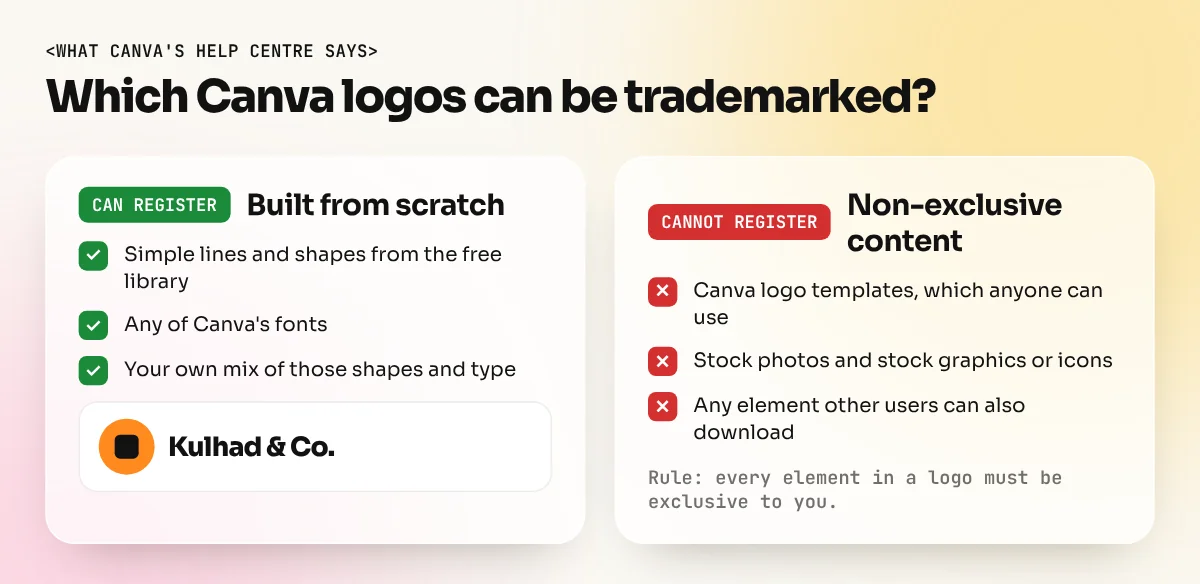
The trademark point matters most. Canva explains that a registered trademark gives "the exclusive right to use that mark", while its stock content comes with only a non-exclusive licence. So a logo built from a Canva template or a stock icon cannot be fully yours in law. Canva also says it does not currently offer exclusive rights to its graphics.
How to make a logo in Canva from scratch
If you want to use Canva and still keep the option of a trademark, build the logo yourself. Canva's help centre allows simple lines and shapes from the free library and all of its fonts for this.
- Write a short brief. Business name, what it sells, who buys it and three words for the feeling, for example "homemade, warm, trusted".
- Sketch on paper first. Draw 10 to 20 tiny thumbnails. Try a wordmark, a letter mark and a simple symbol.
- Create a blank square design. For example 1000 x 1000 px. Do not open a logo template.
- Set the name in type. Try five or six fonts. Pick one that is readable at small sizes. Adjust letter spacing.
- Add a simple shape. Circles, lines, squares and arcs from the free shapes library. Combine and overlap them to make your own symbol.
- Limit colours. One or two colours plus black or white. Check that the logo still works in one colour.
- Test it small. Zoom out until the logo is the size of a WhatsApp display picture. If you cannot read it, simplify.
- Make versions. A horizontal version, a stacked version and a symbol only version.
- Download the right files. PNG for screens, PDF Print for printing and SVG if you have a paid plan.
Stay away from stock icons, illustrations and photos in the logo itself. You can use them freely in posts and posters, but the logo should contain only your own shapes and type. Our step-by-step guide on how to design a logo explains the full brief, sketch and refine process that professionals follow.
Canva download file types for a logo
Canva's help centre lists the file types below. Some options need a paid plan.
| File type | Use for a logo | Free plan |
|---|---|---|
| PNG | Websites, social media, Word documents | Yes, with a background |
| Transparent PNG | Placing the logo on photos and coloured backgrounds | No, paid plans only |
| JPG | Quick previews only | Yes |
| SVG | Scalable vector file for web and some printers | No, paid plans only |
| PDF Standard | Sharing and simple printing | Yes |
| PDF Print | Printing at 300 dpi with bleed and crop marks | Yes, but CMYK profile is a paid option |
A logo should end up as a vector file. Vectors use maths to draw shapes, so they stay sharp at any size, from a pen to a hoarding. A PNG is made of pixels and looks blurry when you enlarge it too much. If your printer says "send the CDR or AI file", that is the reason.
Canva vs Illustrator for logo design
| Point | Canva | Adobe Illustrator |
|---|---|---|
| Learning time | Hours | Weeks to get comfortable |
| Drawing custom shapes | Basic shapes only | Pen tool, Shape Builder, full path control |
| Custom lettering | Very limited | Full control of each letter |
| File formats | PNG, JPG, PDF, SVG on paid plans | AI, EPS, SVG, PDF, PNG and more |
| Print readiness | Basic | Full CMYK, spot colours, outlines |
| Ownership of elements | Templates and stock are non-exclusive | You draw everything yourself |
| Best for | Quick ideas, social graphics, mockups | Final logos and brand identities |
Many designers use both. They sketch and test ideas fast in Canva or on paper, then redraw the chosen logo in Illustrator for the final files. If you are still deciding which tool to learn first, our comparison of Photoshop vs Illustrator vs Canva shows what each tool is best at.
When a Canva logo is enough and when it is not
| Situation | Canva logo from scratch | Move to a vector tool |
|---|---|---|
| Instagram page or WhatsApp business profile | Enough | Not needed |
| School or college project | Enough | Not needed |
| Home business testing an idea | Enough to start | Later, when it grows |
| Trademark registration | Possible only if fully built from scratch | Safer |
| Shop signboard, flex or vehicle wrap | Risky | Yes |
| Embroidery on uniforms or caps | Risky | Yes |
| Full brand identity with guidelines | Limited | Yes |
Common Canva logo mistakes
| Mistake | Problem | Fix |
|---|---|---|
| Using a popular template as is | Your logo matches other businesses | Start from a blank page |
| Adding a stock icon | Not exclusive, cannot be trademarked | Build your own symbol from simple shapes |
| Thin script fonts | Unreadable at small sizes | Test at profile picture size |
| Too many colours or gradients | Hard to print and copy | One or two flat colours |
| Only one JPG file | No transparent or vector version | Keep PNG, PDF and SVG versions |
Canva is a good place to begin, especially for social media work. Our Canva course teaches brand kits, templates and quick social designs the right way. When you are ready to draw logos you can fully own, the Illustrator course covers the Pen tool, Shape Builder, custom lettering and print-ready vector files.
Frequently asked questions
Can I trademark a logo made in Canva?
According to Canva's help centre, you can register a logo made in Canva only if you built it from scratch using simple lines and shapes from the free library and Canva's fonts. Logos made from Canva's logo templates or stock photos and graphics cannot be trademarked because other users can use the same elements.
Can I download a Canva logo with a transparent background for free?
No. Canva's help centre lists transparent PNG and SVG downloads as features of Canva Pro, Teams, Education and Nonprofits plans. Free accounts can still download JPG, regular PNG and PDF.
Is a Canva logo good enough for printing?
For small items like a visiting card, a PDF Print download usually works. For signboards, embroidery or large flex prints, printers often ask for a clean vector file (AI, EPS, SVG or PDF), so a logo built in Illustrator or CorelDraw is safer.
Should a beginner learn Canva or Illustrator for logos?
Start with Canva to practise ideas, fonts and colours quickly. Learn Illustrator once you want precise shapes, custom lettering and proper vector files. Professional logo work in agencies is almost always done in a vector tool.