Figma for Graphic Designers: Do You Need It and What Is It Good For?
Figma for graphic designers explained: what it does well, where Photoshop and Illustrator still win, print limits and how to start learning it for free.
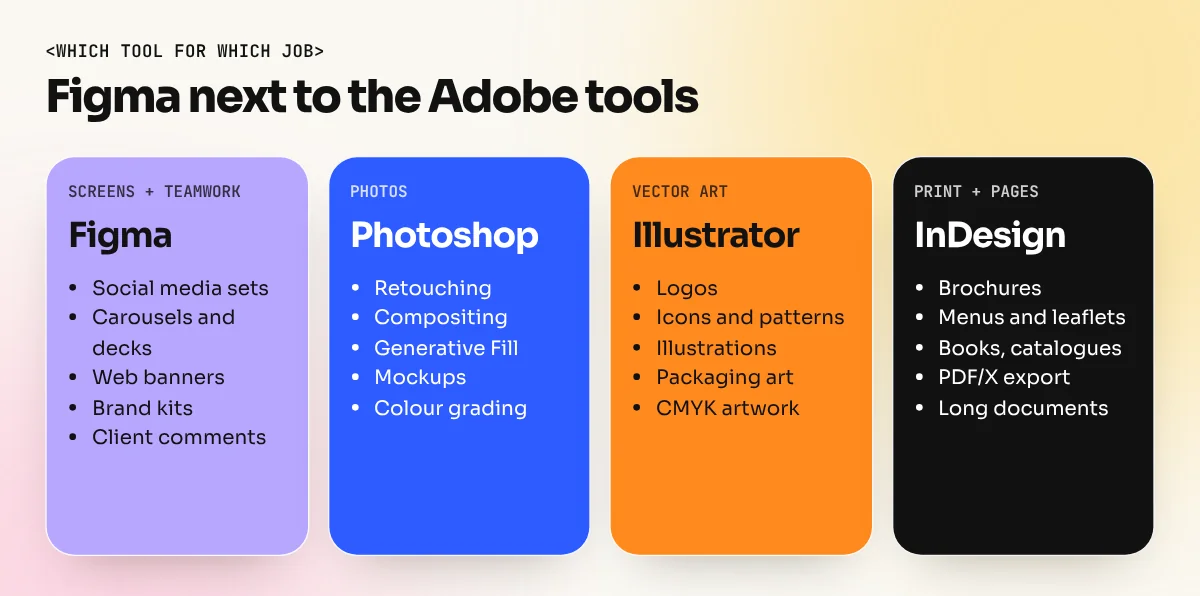
Yes, most graphic designers should learn Figma, but as an extra tool, not a replacement. It is excellent for social media sets, presentations, web banners, brand kits and client reviews in one shared link. Photoshop is still better for photos, Illustrator for detailed vector art and InDesign for print, because Figma cannot export print-ready CMYK files.
Figma for graphic designers is a free-to-start, browser-based design tool that is very good for social media sets, presentations, banners, brand kits and sharing work with clients, but it does not replace Photoshop, Illustrator or InDesign. Figma started as a tool for app and website design. Today many graphic designers use it every day because it is fast, it works in a browser and the client can comment on the same link. This guide explains what Figma does well, where the Adobe tools still win, how it fits into a graphic designer's work and how to start learning it.
What Figma is, in simple words
Figma is a design app that runs in a web browser, with desktop apps for Windows and Mac. Files live online, not on your hard disk. Several people can open the same file at the same time and see each other's cursors, like a Google Doc for design.
Figma works mostly with vector shapes and text, placed inside "frames". A frame can be an Instagram post, a slide, a web page or a phone screen. You can drop photos into a frame, but Figma is not a photo editing app.
At its Config 2025 event, Figma also announced Figma Draw (more illustration tools), Figma Buzz (for making batches of marketing and social assets), Figma Sites (for publishing websites) and Figma Make (an AI tool for prototypes). These show the company moving closer to everyday graphic design work, not only app screens.
What graphic designers use Figma for
| Job | Why Figma works well |
|---|---|
| Social media post sets | One file with many frames for feed, story and carousel sizes |
| Carousels and slide decks | Pages side by side, easy to keep text and spacing the same |
| Web banners and ad sets | Resize one design into many sizes using frames and constraints |
| Brand kits and style guides | Colour styles, text styles and logo components shared with the team |
| Website and landing page mockups | Built for screens, links straight to a developer handover |
| Client reviews | Client comments on the exact spot, no long WhatsApp chains |
| Mood boards and presentations | Quick to arrange and share as one link |
Imagine a Delhi cafe brand that needs 30 Diwali posts in feed, story and WhatsApp status sizes. In Figma you make the logo, colours and fonts into styles and components once. Change the saffron colour in one place and all 30 posts update. That one feature saves hours on every festival campaign.
Where Photoshop, Illustrator and InDesign still win
Figma is strong, but it has clear limits for graphic work:
- Photo editing. Retouching, compositing, masking hair, colour grading and Photoshop Generative Fill and AI image tools are Photoshop's home ground. Figma has only basic image adjustments.
- Complex vector artwork. Detailed logos, illustrations, patterns and type work are still faster in Illustrator, with its pen tool, shape builder, brushes and pathfinder options.
- Print. Figma works in RGB. It does not offer CMYK colour or PDF/X export, so it cannot produce a true print-ready file. Visiting cards, brochures, menus, packaging and books should be finished in InDesign or Illustrator.
- Long documents. Magazines, catalogues and books with master pages, running text and many pages are InDesign jobs.
Our Photoshop vs Illustrator vs Canva guide explains the main tools in more detail if you are still choosing where to start.
Figma features every graphic designer should learn
You do not need every Figma feature. These six cover most graphic design work:
- Frames. The artboards of Figma. Use presets for Instagram, A4 or presentation sizes.
- Auto layout. Makes boxes grow or shrink with their content. A button or tag resizes itself when you change the text.
- Components and variants. Save a logo lockup, price tag or post template once and reuse it. Edit the main one and every copy updates.
- Styles and variables. Save brand colours, text styles and effects so the whole team uses the same values.
- Constraints. Tell elements how to behave when a frame is resized, which helps when you turn one banner into ten sizes.
- Comments and sharing. Share a view-only link with the client and collect feedback inside the file.
Plugins add more: icon libraries, image tools, mockup makers and more. Install only the few you really use, because too many slow the file down.
Should you learn Figma first or Photoshop first?
For most beginners the order is clear. Learn the design basics and the core Adobe tools first, then add Figma.
| If your goal is | Start with | Add Figma when |
|---|---|---|
| General graphic designer at an agency | Photoshop and Illustrator | After 2 to 3 months, for social sets and client work |
| Print, packaging or publishing | Illustrator and InDesign | Later, mainly for presentations |
| Social media and digital marketing design | Photoshop and Canva | Early, because most work is on screens |
| UI or UX design | Figma | From day one |
Figma is easy to start, so it is tempting to skip the basics. But tools do not teach layout, typography, colour or hierarchy. Those skills decide whether your work is good, whatever app you use. If you are unsure whether you want graphic design or app design, read our comparison of graphic design vs UI UX design.
How to start learning Figma for free
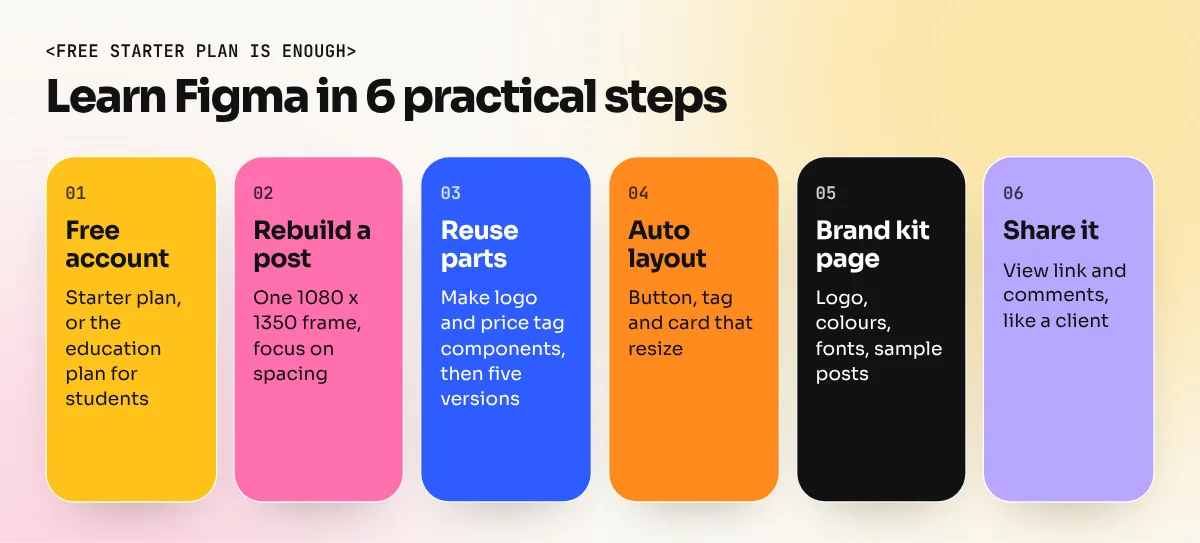
- Make a free account. The Starter plan is enough to learn. If you are a student, apply for Figma's free education plan with your college or school details.
- Recreate one social post. Pick a post from a brand you like and rebuild it in a 1080 x 1350 frame. Focus on spacing and text styles.
- Turn it into a component. Make the logo and price tag components, then create five versions of the post by changing text and photos.
- Learn auto layout. Build a button, a tag and a simple card that resize when the text changes.
- Make a brand kit page. Put the logo, colours, fonts and example posts on one page, as you would hand over to a client.
- Share it. Send a view link to a friend and ask them to leave comments. This is exactly how client review works.
Figma's own help centre and community files have free guides for each feature. Practise on real projects from your portfolio instead of only following tutorials.
Figma in your portfolio and job search
Figma skills help in interviews, especially at digital agencies, startups and in-house brand teams. Show it through work, not just a line on your resume:
- A social media campaign with feed, story and carousel sizes built from one set of components.
- A brand kit page with colour and text styles.
- A landing page mockup for one of your brand projects.
Keep your logos, illustrations and print pieces in Illustrator and InDesign. Present them next to the Figma work. That mix shows an employer you can handle both print and screen.
In our 6-month graphic design diploma you learn Photoshop, Illustrator and InDesign first, then use Figma for social sets and presentations. If your next step is stronger vector skills for logos and icons, the Illustrator course is the best place to build them.
Frequently asked questions
Is Figma free for graphic designers?
Figma has a free Starter plan with limits on files and features. Verified students and teachers can apply for Figma's free education plan. Paid plans add more files, team libraries and admin features. Check Figma's pricing page for current limits.
Can Figma replace Illustrator?
Not fully. Figma handles icons, simple illustrations and layouts well. Figma Draw added more illustration tools. Illustrator is still stronger for complex vector art, detailed logos, patterns and print output in CMYK.
Can I design for print in Figma?
You can design simple print pieces, but Figma works in RGB and has no built-in CMYK or PDF/X export. For anything going to a press, finish the file in Illustrator or InDesign and run a proper print check.
Do Indian agencies ask for Figma skills from graphic designers?
It depends on the work. Digital agencies, startups and in-house brand teams that also run websites and apps are the most likely to ask for Figma next to Photoshop and Illustrator. Print-focused studios ask for it less often. Read the skills list in each job post you apply for.