Standee Design: Roll-Up Sizes, Layout and Print Files
Standee design guide: common roll-up and X-standee sizes in feet, safe zones, a top-to-bottom layout, text sizes and the print file your printer wants.
Standee design starts with the exact size from your printer, usually 2.5 x 6 or 3 x 6 feet for a roll-up. Put the logo and headline in the top third at eye level, one image in the middle and contact details above the bottom foot. Send a CMYK PDF at 100 to 150 ppi with bleed.
Standee design is the planning of a tall, free-standing print that stands on the floor at a shop, event, clinic or college fair and tells people one thing as they walk past. The most common kind in India is the roll-up standee, usually 2.5 x 6 feet or 3 x 6 feet. Good standee design puts the brand and the main message at eye level, keeps the bottom area clear and sends the printer a clean CMYK file at the exact size. This guide covers sizes, safe zones, a layout that works, text sizes and the print file.
Walk through any mall in Delhi, a wedding venue in Chhatarpur or the entrance of a coaching centre and you will see standees on both sides of the door. Most of them say too much. A good standee is read in the time it takes to walk three steps, so the job is to cut the message down to a headline, one picture and one action.
Types of standees
"Standee" is a loose word. Before you open any software, ask the client which stand they are buying, because each one has a different print size and a different hidden area.
| Type | How it stands | Common sizes in India | Best for |
|---|---|---|---|
| Roll-up (pull-up) standee | Print rolls into an aluminium base and is held by a pole | 2.5 x 6 ft, 3 x 6 ft | Events, shops, exhibitions, reception areas |
| X standee | Print hangs on a cross frame with four eyelets | 2 x 5 ft, 2.5 x 6 ft | Low budget, short indoor events |
| L standee | Print hangs from a top bar on an L-shaped frame | 2 x 5 ft | Indoor promotions |
| Cut-out standee | A shaped board, like a life-size person or product | Up to about 6 ft tall | Movie promotions, brand photo points |
| Tabletop standee | Small stand on a counter | A4, A3 | Billing counters, menus, QR codes |
The sizes above are what printers commonly list. Stand makers differ, so treat them as a starting point and confirm the exact print area every time.
Roll-up standee size and safe zones
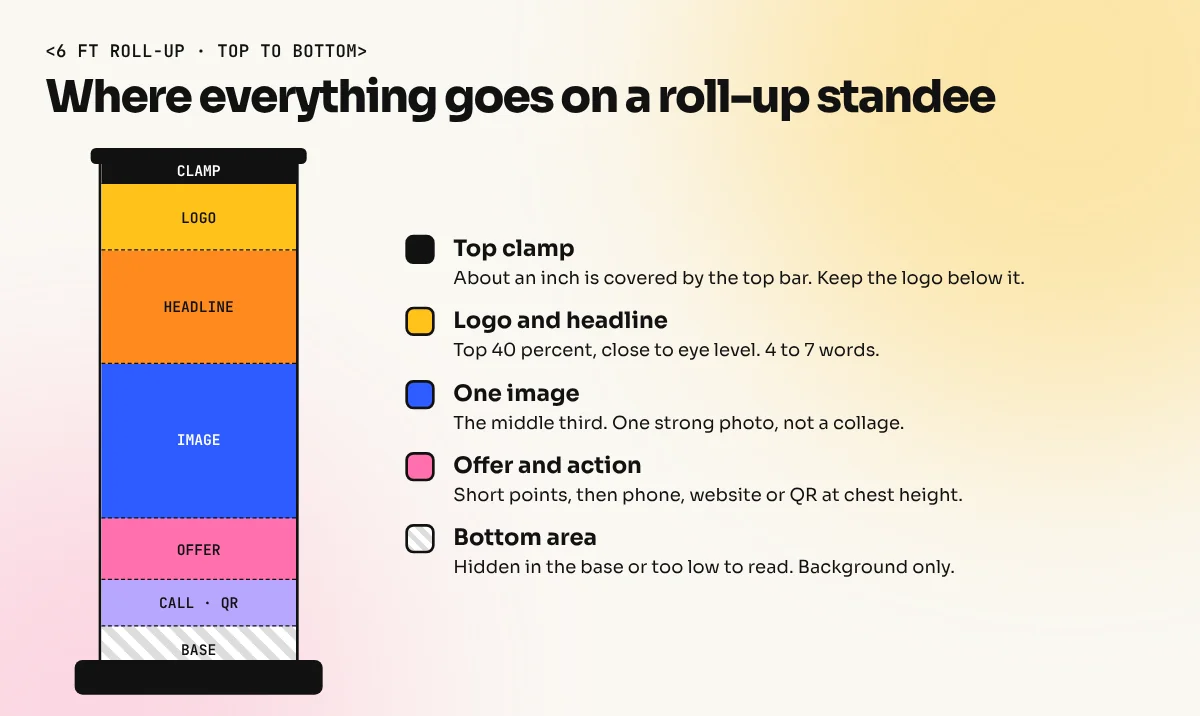
A roll-up standee is not fully visible. Part of the print goes inside the base and part is clamped under the top bar. Design with three zones in mind:
- Hidden area at the bottom. A few inches roll into the base cassette. Ask the printer how much. Nothing goes here except background colour.
- Low reading zone. The bottom foot or so is close to the floor. People rarely bend to read it, so use it only for background or a pattern.
- Top clamp. The top bar covers a strip of an inch or so. Keep the logo below it.
Inside these limits, also keep text at least 2 to 3 inches from the left and right edges. Standees are often placed at an angle and the edge is the first thing that disappears.
A layout that works: top to bottom
Most readers stand one to three metres away and look at the standee for a few seconds. Plan the layout from the top down:
| Zone (from top) | What goes there | Why |
|---|---|---|
| Top 15 percent | Logo | First thing seen above the crowd |
| Next 25 percent | Headline of 4 to 7 words | This is close to eye level for most adults |
| Middle 30 to 35 percent | One strong image | Photo of the product, food, person or result |
| Lower middle | 2 to 3 short points or the offer | "Free trial class", "Flat 20% off till Sunday" |
| Above the bottom foot | Action: phone, website or QR code | Easy to scan while standing |
| Bottom area | Background only | Hidden by the base or too low to read |
Use one image, not a collage. Use two fonts at most. Leave space. A standee that looks "empty" on screen usually looks right in a busy hall.
How big should the text be?
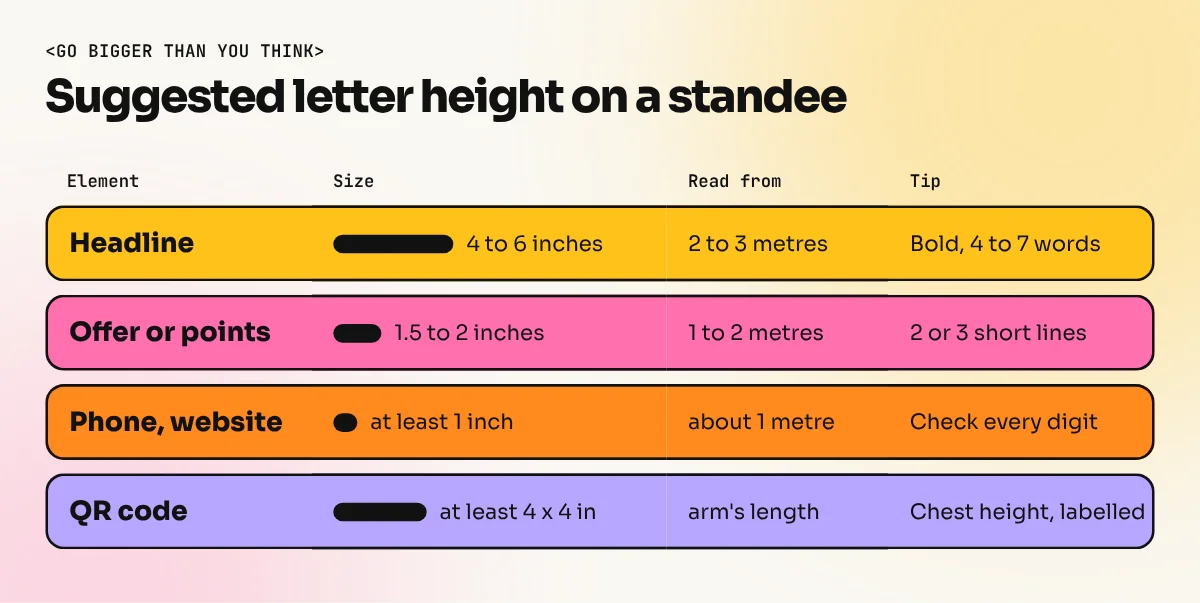
A common rule used by sign makers is about one inch of letter height for every ten feet of reading distance for text to be read easily. Standees are read from closer, but people are moving, so go bigger than you think:
- Headline: 4 to 6 inches tall for the capital letters.
- Offer or key points: about 1.5 to 2 inches.
- Phone number and website: at least 1 inch.
- QR code: at least 4 x 4 inches, placed at chest height, with a short line like "Scan for fees".
Print a small test. Take your design at A4 size, stick it on a wall and step back about 60 cm. If you cannot read a line easily, it is too small on the real standee as well.

In this Hindi video, designer Iqbal Alam builds a roll-up standee in CorelDraw, from setting the page size to placing the image with PowerClip and adding a gradient background.
How to design a standee, step by step
- Get the facts. Stand type, exact print size, hidden area, where it will be placed and the one action the client wants.
- Set up the file. Make the page the exact print size in CorelDraw or Illustrator, set the document to CMYK and add bleed as the printer asks, often 3 to 5 mm or more.
- Mark the zones. Draw guides for the top clamp, the hidden base area and side margins.
- Place the logo and headline first. Then the image. Then the points and the action.
- Pick high contrast colours. Dark text on light, or white text on a deep colour. Standees often stand under yellow mall lights, which make pale colours look dirty.
- Prepare the photos in Photoshop. Check the size at 100 percent view of the final print. A phone photo that looks sharp on screen can look soft at 6 feet.
- Proof it. Check spelling, phone numbers, dates and the QR code link. One wrong digit wastes the whole print.
- Export the print file. Convert text to curves or embed fonts, then export a press PDF.
If you work in CorelDraw, the CorelDraw course covers page setup, PowerClip and print export, which are the tools you use most on standees. For photo clean-up and cut-outs, the Photoshop course helps.
Resolution, colour and file checks
Standees are large, but they are not seen from the road like a hoarding. Most printers are happy with 100 to 150 ppi at the full print size. Keep the logo, text and shapes in vector so the edges are crisp at any size.
| Check | What to do |
|---|---|
| Size | Exact print size from the printer, not "6 feet roughly" |
| Colour mode | CMYK, with a rich black for large dark areas if the printer allows |
| Resolution | About 100 to 150 ppi at full size for photos |
| Bleed | As the printer asks, often 3 to 5 mm or more |
| Fonts | Converted to curves or embedded in the PDF |
| File | Press-quality PDF, plus the CDR or AI file if the printer asks |
| Proof | Client signs off on a small printout or a PDF before printing |
Our print-ready file checklist goes through these checks in detail and they apply to standees exactly.
Common standee design mistakes
- Too much text. A standee is not a brochure. If you need a paragraph, design a leaflet and keep it on a table next to the standee.
- Important text at the bottom. It is hidden by the base, by people standing in front or by a table.
- Thin fonts. Light and script fonts break up when seen from a distance.
- Busy backgrounds. A photo behind text makes it hard to read. Use a plain colour panel behind the headline.
- Ignoring the brand. The standee must use the same logo, colours and fonts as the client's visiting cards, flex and social posts.
- Copying a web banner. A horizontal web design squeezed into a tall standee never works. Redesign for the tall format.
Standees sit in the same family as flex banners, hoardings and posters. Once you know these rules, our guide to banner design shows how to adapt the same message for wide formats.
Frequently asked questions
What is the standard size of a roll-up standee?
There is no single standard, but most Indian printers sell roll-up standees in 2.5 x 6 feet and 3 x 6 feet. Always ask the printer for the exact print size in inches or millimetres, because some stands hide a few extra inches inside the base.
Which software is best for standee design?
CorelDraw is the most common choice in Indian print shops and Adobe Illustrator is common in agencies. Use Photoshop to prepare the photos. Canva also works for simple standees if you set the exact custom size and download a print PDF.
What resolution should a standee file be?
About 100 to 150 ppi at full print size is enough for most standees, because people read them from one to three metres away. Keep the logo and text as vectors so the edges stay sharp.
What is the difference between a roll-up and an X standee?
A roll-up standee rolls into an aluminium base and pulls up like a blind, so it is quick to set up and protects the print. An X standee hangs the print on a cross-shaped frame with eyelets. It is lighter and cheaper but less stable outdoors.