"Calendar Design: Wall and Desk Calendar Layouts"
Calendar design made simple. Learn wall and desk calendar layouts, page sizes, date grids, festival marking, fonts and print setup, with a step-by-step workflow.
Good calendar design starts with the type of calendar, then the page size, then a clear date grid. Pick a wall, desk or poster layout, set up twelve month pages with the same grid, make dates large and easy to read, mark holidays in one accent colour and leave 5 mm or more of safe margin and bleed for printing.
Calendar design is the work of arranging twelve months of dates so people can read them in a glance, while the page still looks good on a wall or a desk. A good calendar does two jobs at once. It is a useful tool every day. It is also a small advertisement for the brand that gave it away. This guide covers the types of calendars, the layout, the date grid, fonts, colours and the print setup, so you can design a 2027 calendar with confidence.
Start with the type of calendar
Before you open any software, decide what kind of calendar you are making. The type decides the size, the number of pages and how the design behaves.
| Type | Where it is used | Pages | Design focus |
|---|---|---|---|
| Wall calendar | Homes, shops, offices | 6 or 12 sheets | Big dates, space to write, strong picture |
| Desk calendar | Office tables | 12 small pages on a stand | Compact grid, easy to flip |
| One-page poster calendar | Shops and clinics | 1 large sheet | All twelve months visible together |
| Planner or diary page | Corporate gifts | Many | Notes space, week view |
Most small businesses in Delhi ask for a wall calendar or a desk calendar because they work as a gift for clients. A one-page poster calendar is cheaper to print and is popular with local shops and schools.
Choose the page size
Set the page size at the start, because changing it later breaks every month. Typical wall calendars are printed on A4 or A3 sheets. Desk calendars use a smaller wide or tall size that fits a stand. Printers have their own standard sizes and ways to bind the sheets, so ask your printer for the exact size and the binding style before you design.
Remember three print rules:
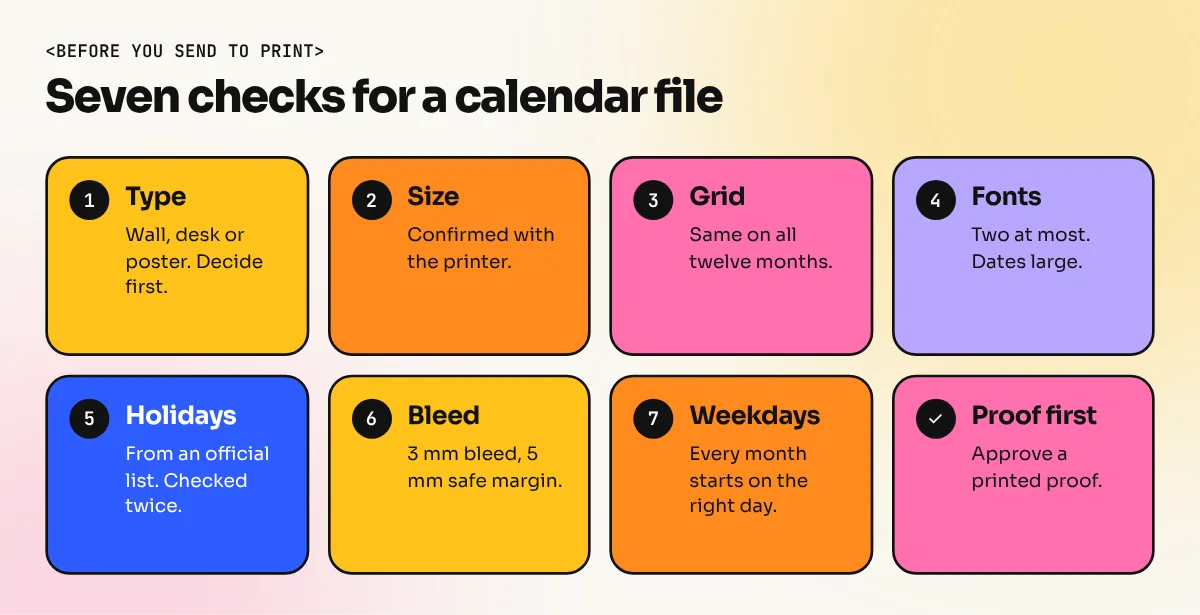
- Bleed. Extend background colour and pictures 3 mm past the cut line.
- Safe margin. Keep text at least 5 mm inside the cut line.
- Binding space. A wall calendar with a hanging hole or wire needs a clear area at the top, so no date or heading should sit there. Our print-ready file checklist explains these settings in detail.
Plan the layout of one month page
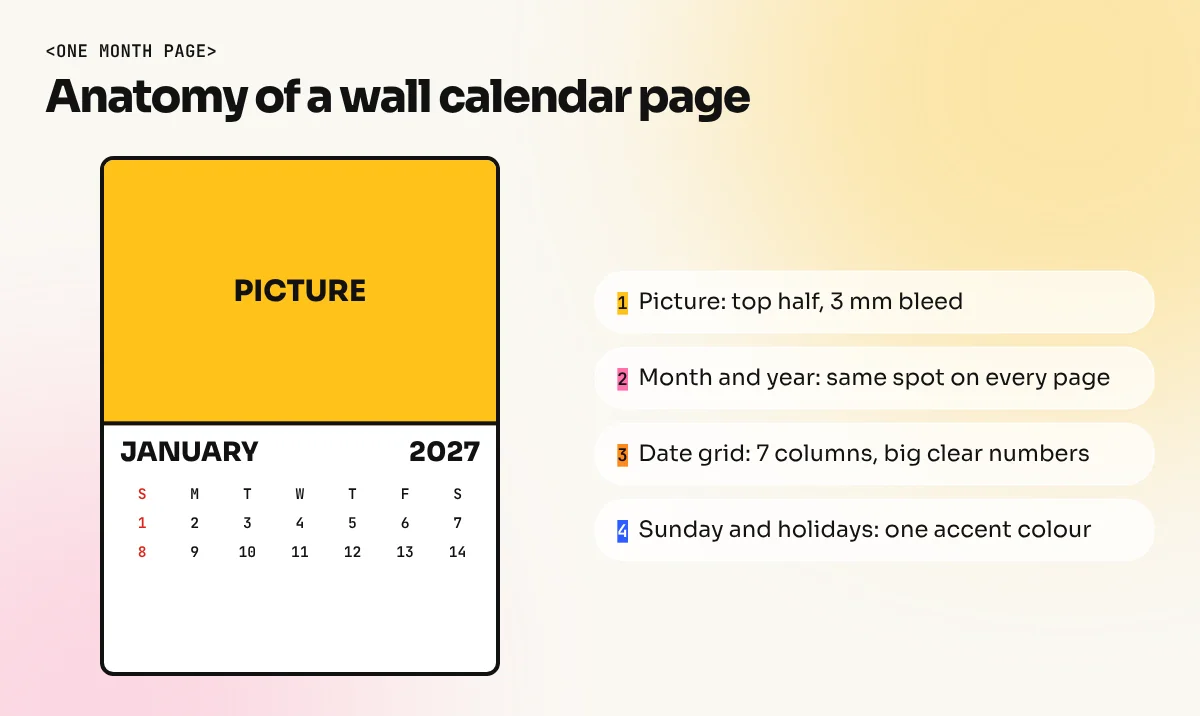
A wall calendar page is usually split into two zones. The top is a picture or illustration. The bottom is the date grid. Some designers put the picture on one sheet and the dates on the next, which gives more room for both.
Use these layout ideas:
- Picture half, grid half. The classic layout. The picture takes the top 55 to 60 percent and the dates take the rest.
- Full-bleed picture with a clean date panel. The picture covers the page and a solid box holds the dates. Make sure the panel has enough contrast.
- Dates only. Used for office and desk calendars. The grid takes the whole page and the brand sits in a thin header.
Whichever layout you choose, repeat it on every month. Same position for the month name, same grid size and same margins. A grid you set up once should be reused on all twelve pages. If you want to go deeper into page structure, read our guide to layout design.
Build the date grid
The date grid is the heart of the calendar. Get this right first.
- Make seven columns for the days and up to six rows for the weeks. Some months need all six rows.
- Decide the first day of the week. Many Indian calendars start on Sunday. Others start on Monday. Pick one and use it in all months.
- Set the dates large. People read a wall calendar from two metres away, so the numbers need to be big and in a clear font.
- Add space inside each box if you want customers to write notes. About one to two lines of room is useful.
- Mark Sundays and holidays in one accent colour, usually red. Use only one colour so it stays easy to read.
- Keep the grid lines thin or use none. Even spacing can separate dates without heavy boxes.
In InDesign, a table or a series of guides with a master page helps keep every month the same. In CorelDRAW, the Graph Paper tool or a table object can build the grid quickly.
Add festivals and holidays carefully
Indian customers expect festival names on a calendar. This is the part where mistakes cost trust. Many festival dates follow the lunar calendar, so they change every year. Some are observed on different days in different states.
- Take dates only from an official government holiday list or a trusted panchang for that year.
- Mark national holidays in the accent colour and keep other festivals in a smaller, lighter style.
- Check every date twice, then ask the client to approve the proof in writing.
- If you are making a calendar for a particular community or region, include the festivals that matter to them.
Choose fonts and colours
Use two fonts at most. One clear, simple font for the dates and one expressive font for the month name, or the same font in two weights. Dates should never be decorative or thin. If you need help choosing, see our guide to font pairing.
For colour, pick a main brand colour for headings, a neutral for dates and one accent for holidays. Test the calendar in black and white as well, because some offices print on a plain office printer.
Step-by-step workflow
- Collect the brief. Ask for the logo, contact details, the year, the type of calendar and the theme.
- Choose the size and binding with the printer.
- Set up a master page with the grid, margins and bleed.
- Design the cover or the first month and get it approved.
- Copy the layout to the other months and change only the dates and pictures.
- Add holidays from the official source and double-check them.
- Proofread the month names, dates and weekdays. One wrong weekday ruins the whole calendar.
- Export a print-ready PDF in CMYK with bleed.
- Order a proof before the full print run.
Common calendar design mistakes
- Dates too small. The most common problem. If you must squint, the dates are too small.
- Pictures that fight the dates. If a photograph sits behind the grid, use a solid panel.
- Wrong day alignment. Check that the first day of each month sits under the right weekday.
- Low-resolution images. Pictures should be 300 dpi at the printed size.
- No space for the hanging hole. Keep the top margin clear.
- Too many logos and offers. A calendar stays on the wall for a year. A clean, calm design gets kept. A cluttered one gets thrown away.
Calendar ideas to practise
Try these three small projects for your portfolio. First, a one-page 2027 poster calendar for a neighbourhood chai shop. Second, a 12-page desk calendar for a coaching centre with one study tip per month. Third, a six-sheet wall calendar for a local sweet shop that uses a photo of a different mithai on each page. Each project teaches grid work, hierarchy and print preparation.
If you want to learn the tools properly, the CorelDRAW course covers print layouts used by Indian printers and the InDesign course teaches multi-page documents such as calendars, brochures and magazines.
The bottom line
Calendar design looks simple but rewards care. Choose the type first, fix the page size with your printer, build one clean date grid, mark holidays from an official source and repeat the same layout on every month. Then proof twice before printing. A calendar that is easy to read and nice to look at will hang on a wall for twelve months.
Frequently asked questions
Which software is best for calendar design?
InDesign is the best for multi-page calendars because master pages and tables keep all twelve months the same. CorelDRAW is also popular with Indian printers for single sheet and desk calendars. Canva works for simple one-off designs.
What size should a wall calendar be?
There is no single rule. Common choices are A4, A3 and a long strip size for wall hanging. Ask your printer which sizes they print without waste and set the page to that size before you start.
When should I start designing a calendar for next year?
Start two to three months before the new year. Printers get busy in November and December, so finishing design and approvals early gives you time for a proof and corrections.
Should I put Indian festival dates in my calendar?
Yes, most Indian customers expect them. Always check each date against an official government holiday list or a trusted panchang for that year, because some festival dates depend on the moon and shift every year.