Menu Card Design: Restaurant Menu Layout, Type and Print Tips
Menu card design step by step: sections, prices, fonts, photos, FSSAI calorie and veg marks, sizes and print-ready files for cafes and restaurants in India.
Good menu card design groups dishes into clear sections, lists each dish with a short description and an aligned price, uses two readable fonts and a small number of photos, then adds the required veg or non-veg marks. Plan the layout on a grid, set it in InDesign and export a CMYK PDF with 3 mm bleed for print.
Menu card design is the planning and layout of a restaurant or cafe menu so guests can find dishes, read prices and decide quickly. A good menu is clear first and pretty second. It groups dishes into sections, puts each price in the same place, uses fonts that work in low light and leaves enough space to breathe. This guide covers the full process of restaurant menu design, from listing the dishes to sending a print-ready file, with the Indian rules you need to follow.
What a good menu card needs to do
A menu has three jobs. It helps guests choose fast, it shows the style of the place and it nudges orders towards dishes the owner wants to sell. A beautiful menu that confuses people fails all three.
Most diners spend only a short time with the menu before they order. In that time they look for a category, scan a few dishes and check the price. Your layout should make that path obvious.
| Job | What helps | What hurts |
|---|---|---|
| Help people choose | Clear sections, short descriptions, readable type | Long lists, tiny fonts, no grouping |
| Show the brand | Colours, fonts and illustrations that match the space | Free template that looks like every other cafe |
| Guide orders | Highlighted signature dishes, smart placement | Every dish looking equally important |
How to plan and lay out a menu card
The first three steps happen before you choose a single colour.
Step 1: Plan the content before you design
Start with a text file, not a design tool. Get the final list from the owner or chef and organise it.
- List every dish with its exact name, a one-line description and the price.
- Group into sections in the order people eat: starters, mains, breads and rice, desserts, drinks.
- Mark special items: chef's signature dishes, bestsellers, spicy items, Jain options.
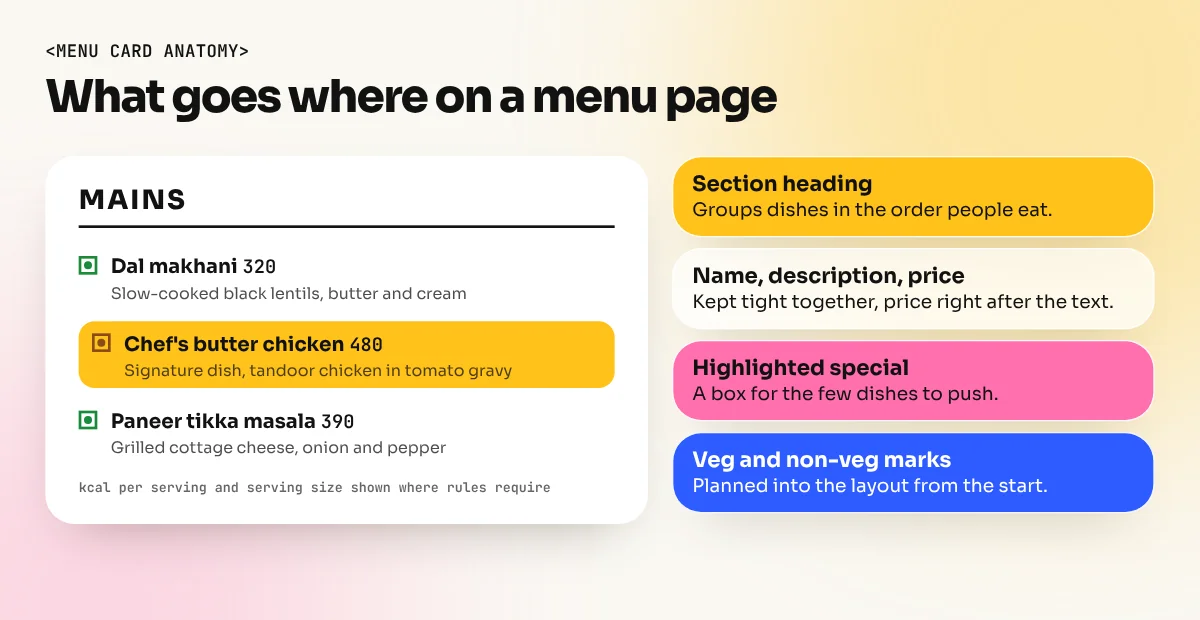
- Collect the required marks: veg and non-veg symbols, allergen notes and calorie details if needed (see the FSSAI section below).
- Get it approved in writing before layout. Changing a price after printing is expensive.
Write descriptions in plain words. "Slow-cooked dal makhani with butter and cream" tells guests more than "Our legendary house special". Keep most descriptions to one line.
Step 2: Choose the format and size
There is no standard menu size. Choose based on the number of dishes, the table size and how the menu will be used.
| Format | Common size | Best for |
|---|---|---|
| Single card | A4 or A5 | Cafes, short menus, chai and snack outlets |
| Bi-fold | A3 folded to A4 | Family restaurants with 4 to 6 sections |
| Tall card | DL style (99 x 210 mm) | Drinks, desserts, specials |
| Booklet | A4 or A5 with several pages | Large restaurants, hotels, multi-cuisine places |
| Wall or board menu | Custom | Quick-service counters, food courts |
| QR or digital menu | Phone screen | Contactless ordering, frequent price changes |
Many places now need both a printed menu and a phone version for QR codes. Design the print version first, then adapt it into a single-column layout for phones.
Step 3: Build the layout on a grid
A grid keeps the menu tidy even when sections have different lengths. For an A4 page, a two-column grid with 12 to 15 mm margins works well. A booklet can use the same grid on every page so it feels like one family. Our guide to layout design explains margins, columns and alignment in more detail.
Key layout rules for menus:
- Group dish name, description and price tightly, with clear space before the next dish. Spacing alone tells the reader which price belongs to which dish.
- Align prices in one consistent place. Many designers put the price just after the description instead of in a far-right column, so guests read the dish before the number.
- Drop the rupee symbol and the ".00" if it fits the brand. A plain "320" looks cleaner than "Rs. 320.00".
- Use boxes or colour bands only for things that must stand out, such as a thali, a combo or the chef's specials.
- Leave white space. A crowded menu feels cheap and is hard to read in a dim room.
Fonts, colours and photos
Once the structure works, decide how the menu looks.
Step 4: Pick fonts and colours that work in real light
Restaurants are often dim and guests may be older or not wearing glasses. Type choices matter more on a menu than on most print jobs.
- Use two fonts at most. One for section headings (can have character) and one for dish names and descriptions (must be easy to read).
- Body text size: around 10 to 12 pt for descriptions on a printed menu, larger for dish names. Print a test page and read it in a dim corner.
- Strong contrast. Dark text on a light background is safest. Light text on dark paper looks premium but needs a bigger, bolder font.
- Limit the palette to two or three colours from the restaurant's brand.
Need help with fonts? Our guide to font pairing lists combinations that work well for headings and body text.
Step 5: Use photos and highlights carefully
A few good photos can sell a dish. Too many make the menu look like a fast-food board. For most sit-down restaurants, use photos only for signature dishes or skip them and use illustrations.
To highlight dishes the owner wants to sell, restaurant managers use a method called menu engineering. It was set out by Michael Kasavana and Donald Smith in 1982 and sorts dishes into four groups by popularity and profit: Stars, Plowhorses, Puzzles and Dogs. The designer's job is to make the Stars and high-profit Puzzles easy to notice with a box, an icon, a small photo or a top position in the section.
Keep highlights rare. If half the menu is boxed, nothing stands out.
The rules: FSSAI marks, calories and allergens
Menus in India must follow FSSAI rules. Check the latest version with the owner before printing, because rules can change.
| Item | What the rules ask for | Who it applies to |
|---|---|---|
| Veg and non-veg logo | The prescribed green or brown symbol next to dishes | Food businesses displaying menus |
| Calories | Calorie value in kcal per serving and the serving size | Businesses with a central licence or outlets at ten or more locations |
| Reference line | A clear line that an average active adult needs 2,000 kcal a day, though needs vary | Same as above |
| Allergens | Information on common allergens such as gluten, milk, eggs, nuts, soy, fish and crustaceans | Same as above |
The calorie and allergen requirements came into force on 1 January 2022, according to FSSAI's labelling and display rules. Design space for these marks from the start. Adding them at the end usually breaks the layout.
Step 6: Prepare the file for print
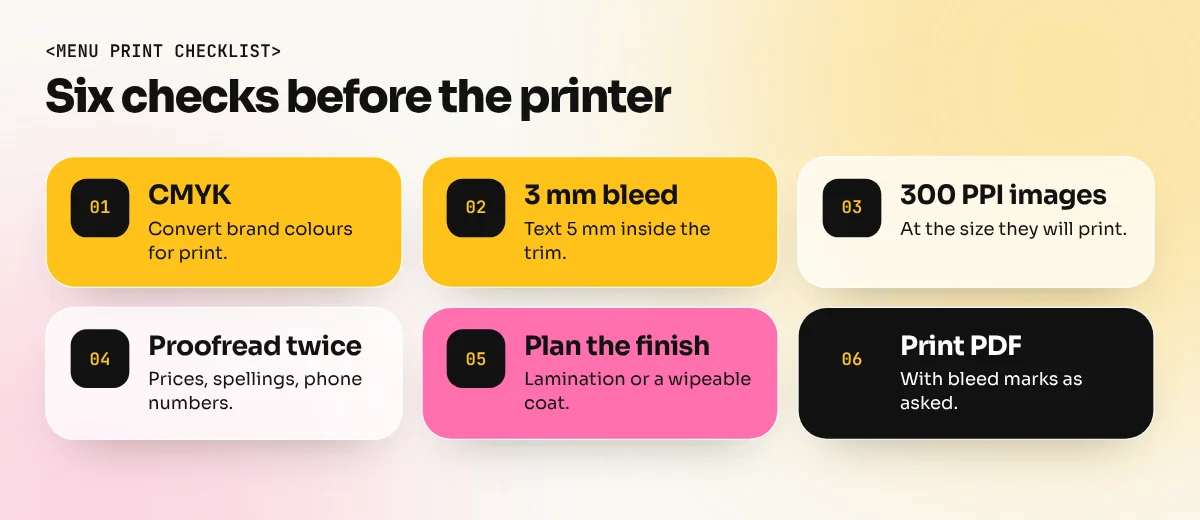
Most menu mistakes happen at the printer, not on screen. Before you send the file:
- Set the document in CMYK and convert brand colours. Our guide to CMYK vs RGB explains why bright screen colours can print dull.
- Add 3 mm bleed on all sides and keep text at least 5 mm inside the trim.
- Use 300 PPI images at the size they will print.
- Check every price, spelling and phone number twice, then get the owner to sign off.
- Plan the finish. Lamination or a wipeable coating helps menus survive oily fingers and spilled chai.
- Export a print PDF with bleed marks, as the printer asks.
InDesign makes this part much easier with paragraph styles, master pages and a proper print PDF export. If you want to design menus, brochures and booklets for clients, an InDesign course is the most direct route. For a wider skill set that also covers branding, Photoshop and Illustrator, the 6-month graphic design diploma includes print projects like menus in its portfolio work.
Common menu card design mistakes
| Mistake | Fix |
|---|---|
| Prices in a long right-hand column | Place the price right after the description |
| Tiny text to fit more dishes | Cut dishes or add a page, never shrink below readable size |
| Five or more fonts | Two fonts, used with clear styles |
| Photos of every dish | Photos or illustrations only for signature items |
| No space for veg marks and calories | Plan these marks in the first layout |
| Gloss paper that reflects light | Matte or soft-touch finish for dim rooms |
The bottom line
Menu card design is about clarity: clear sections, short descriptions, readable fonts, sensible prices and the right legal marks. Plan the content first, build the layout on a grid, test it in real light and send the printer a clean CMYK PDF with bleed. A menu built this way helps guests decide faster and helps the restaurant sell its best dishes.
Frequently asked questions
Which software is best for menu card design?
Adobe InDesign is the usual choice for multi-page or print menus because of its grids, styles and PDF export. Illustrator works well for single-page menus with heavy graphics and Canva is fine for quick social or QR menus.
What size is a restaurant menu card?
There is no fixed size. A4 (210 x 297 mm) and A3 folded to A4 are common in India, while cafes often use A5 cards or tall DL-style cards. Always confirm the size with the printer before you start.
Is it mandatory to show calories on a menu in India?
Under FSSAI labelling and display rules, in force from 1 January 2022, food businesses with a central licence or outlets at ten or more locations must show calories per serving and serving size. Smaller outlets should still check the current rules for their licence.
How many items should a menu have?
There is no fixed number. Most menu designers advise keeping each section short so guests can choose quickly. A smaller, well-organised menu is easier to read and easier for the kitchen to deliver.